
What this template is for
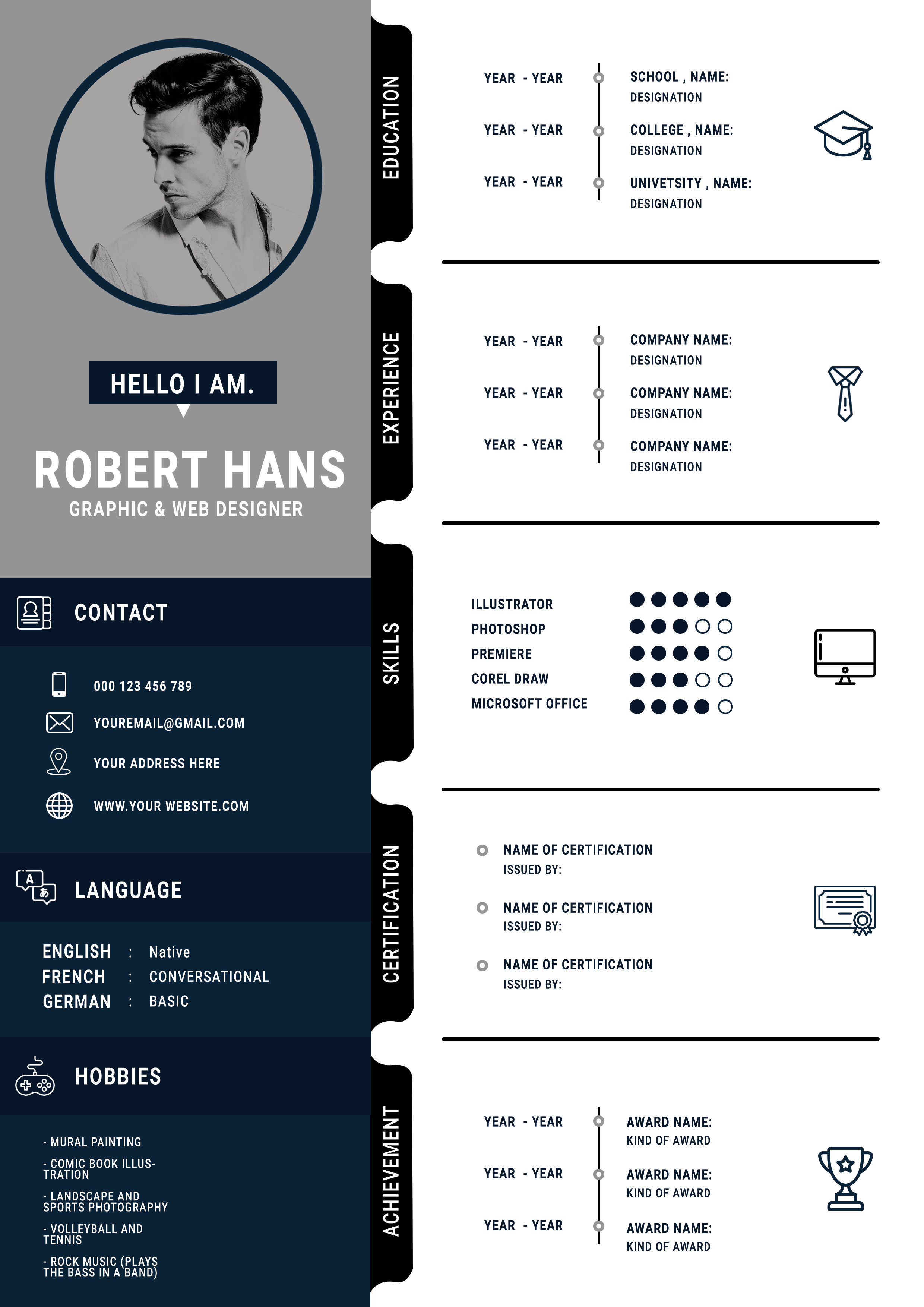
Free Photoshop Resume Template 93 is a structured infographic-style CV in navy, gray, black, and white. Its modular sections make credentials easy to scan, while the portrait and dark sidebar provide a strong visual identity. It works especially well for graphic or web designers, junior creative professionals, and candidates with certifications, awards, or measurable software skills.
Design details
- A gray profile column contains a large circular portrait, a compact introduction, and a bold name and role block.
- The deep navy sidebar groups contact details, languages, and hobbies with neat white line icons.
- The white main column is divided into education, experience, skills, certification, and achievement modules.
- Black vertical tabs label each module, while thin rules and timeline dots connect years to institutions or employers.
- Five-dot skill ratings and simple outline illustrations add an infographic feel without overpowering the content.
The condensed uppercase typography feels technical and efficient. Rounded tab ends soften the grid, and the limited palette keeps the numerous sections cohesive. Use a head-and-shoulders portrait with enough negative space for the circular crop. A monochrome image will match the shown design most naturally.
How to use it
- Download the ZIP file and open the layered source in Photoshop.
- Replace the portrait, then update the introduction, contact information, languages, and hobbies in the left side.
- Enter dates and concise details in each timeline row, removing unused rows rather than filling them with weak material.
- Set skill dots honestly, check alignment across all modules, and export the finished resume as a high-resolution PDF.
Download
Download free-photoshop-resume-template-109.zip“>Download resume93.zip
Related templates
Use the resume hub to refine your content, then review the branding guide if you want to adapt the navy palette or icon style.
FAQ
Can I edit this resume in Photoshop?
Yes. The PSD can be customized in Photoshop, including the portrait, text, module labels, icons, colors, lines, and skill indicators.
What should I change first?
Replace the portrait and personal details first. Next, decide which right-side modules matter for your application so the strongest qualifications receive the most room.
Can I use it for job applications today?
Yes. It is best for a recruiter or client who will view the designed PDF. Submit a simplified companion resume when an employer requires automated text parsing.








