
What this template is for
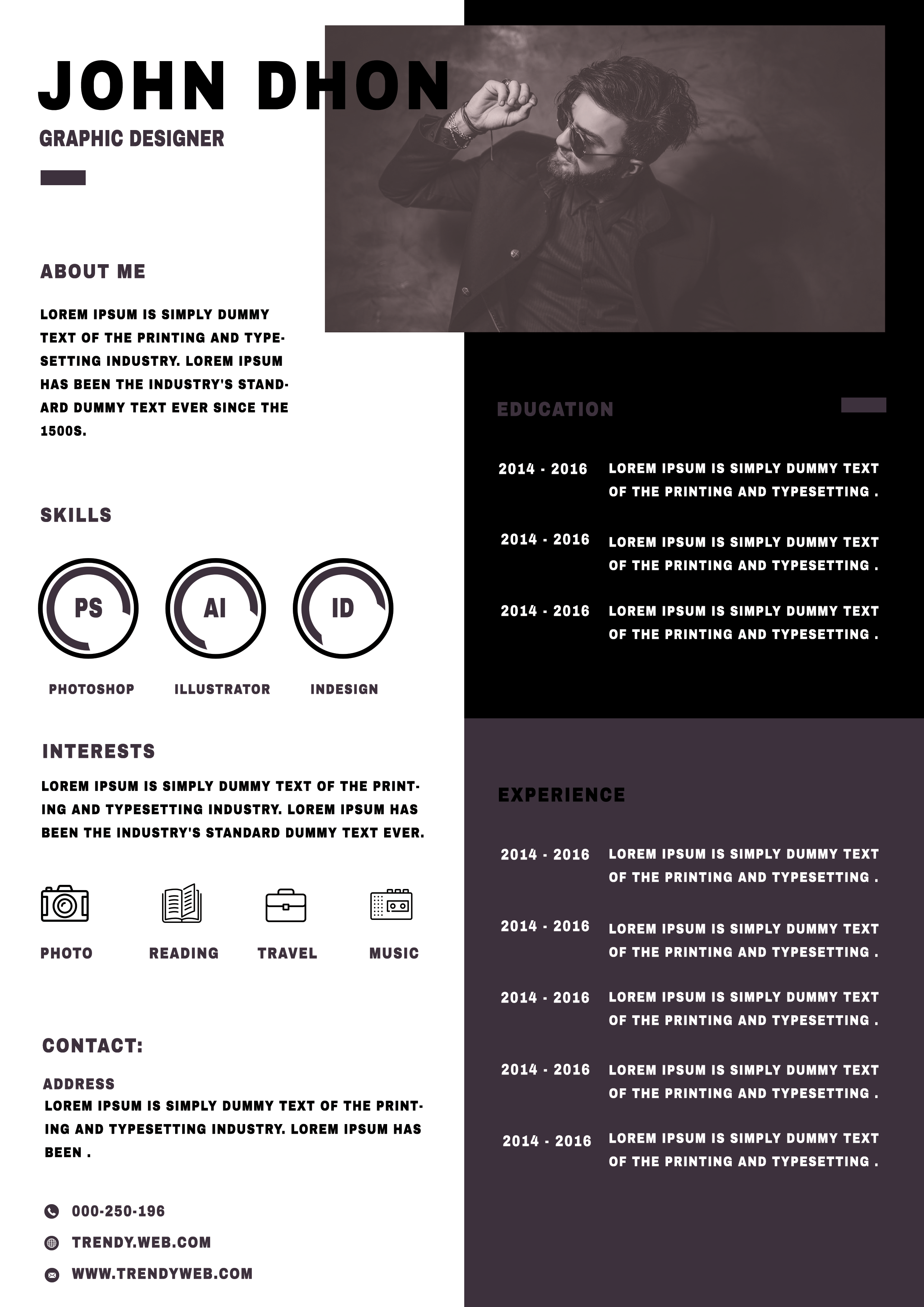
Free Photoshop Resume Template 92 is a graphic two-column CV with a sharp monochrome look and a muted charcoal-purple accent. It is designed for creative applicants who want their personal style and software abilities visible at a glance. The layout is a natural fit for graphic designers, art directors, and digital content creators with a compact work history.
Design details
- The white left column introduces the candidate with a large uppercase name, job title, short profile, and a small accent bar.
- A wide landscape photo fills the upper-right corner, creating a cinematic visual zone rather than a conventional passport portrait.
- The black upper panel presents education in compact dated rows, while the dark purple lower panel contains experience.
- Circular Photoshop, Illustrator, and InDesign skill badges become a focal point in the left column.
- Simple line icons identify interests such as photography, reading, travel, and music, with contact information anchored at the bottom.
Heavy geometric sans serif type, small uppercase labels, and strict blocks give the page an assertive studio-portfolio mood. The nearly black palette keeps it professional, and the subtle purple tint adds depth. Choose a wide photo with the subject placed toward one side so cropping does not hide the face or gesture.
How to use it
- Download the ZIP file and open the PSD in Photoshop.
- Replace the banner image, then enter your name, role, profile, and contact details.
- Customize the software badges and interest icons so they reflect tools and activities you can discuss confidently.
- Condense education and experience entries to fit the dated rows, then export the finished page as a print-ready PDF.
Download
Download free-photoshop-resume-template-108.zip“>Download resume92.zip
Related templates
Visit the resume hub for guidance on stronger content, and consult the branding guide before changing the photo treatment, type, or accent color.
FAQ
Can I edit this resume in Photoshop?
Yes. You can replace the image and modify the typography, panels, icons, badge labels, and all resume text in the PSD.
What should I change first?
Start with the banner photo and name block. Then tailor the three software badges, since those prominent circles should feature your strongest and most relevant tools.
Can I use it for job applications today?
Yes, particularly for design-led roles or direct email applications. Because the structure is highly visual, keep a plain ATS-friendly version for portals that parse resumes automatically.








