
What this template is for
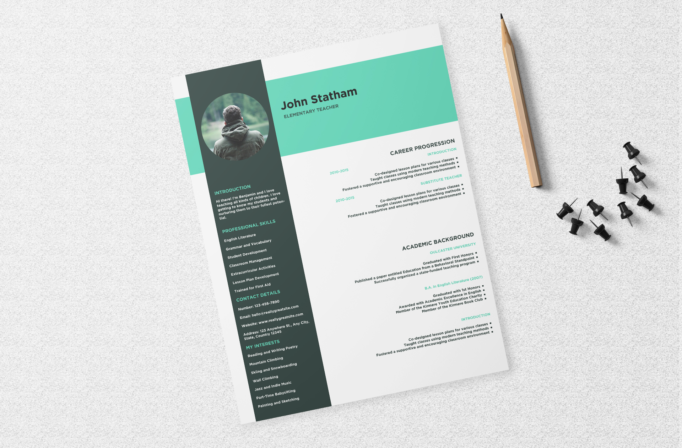
Free Photoshop Resume Template 8 is a modern teacher resume with a fresh mint-green banner and a dark slate sidebar. It organizes a substantial amount of information into a clear visual hierarchy while retaining an approachable classroom-friendly mood. It is a strong fit for elementary teachers, substitute teachers, tutors, and education program applicants who want to combine credentials with a little personality.
Design details
- A wide mint header carrying the candidate name and teaching title in bold dark type
- A tall charcoal sidebar that overlaps the header and contains a circular portrait
- Sidebar sections for introduction, professional skills, contact details, and personal interests
- A bright main area devoted to career progression and academic background
- Mint subheadings and dates that connect the main column visually to the header
- Compact sans serif typography with right-aligned main content and small square bullet markers
The contrasting vertical panel gives the resume an immediate structure: quick personal facts stay on the left, while employment and education receive the larger reading area. The circular outdoor portrait softens the geometric layout. Although the preview is shown at an angle on a textured desk, the resume itself is a clean, straight-edged page suitable for digital export.
How to use it
- Download the ZIP file and open the PSD in Photoshop.
- Replace the circular photo and update the name, title, introduction, and contact details.
- Tailor the professional skills to the position, including subjects, grade levels, classroom tools, or certifications.
- Rewrite the career and education entries with accurate dates and concise evidence of teaching impact.
- Remove optional interests if you need more room for credentials, safeguarding, or professional development.
- Export as a high-resolution PDF and inspect the small sidebar text before applying.
Download
Download free-photoshop-resume-template-94.zip“>Download resume8.zip
Related templates
See the resume hub for stronger achievement writing and the branding guide for help adapting the mint and charcoal palette.
FAQ
Can I edit this resume in Photoshop?
Yes. The PSD allows changes to the photo, colors, section headings, dates, and all resume copy.
What should I change first?
Begin with the teaching title and career progression so the resume immediately matches the grade level and role you are targeting.
Can I use it for job applications today?
Yes. It is well suited to school applications and direct email submissions once the sample credentials have been fully personalized.








