
What this template is for
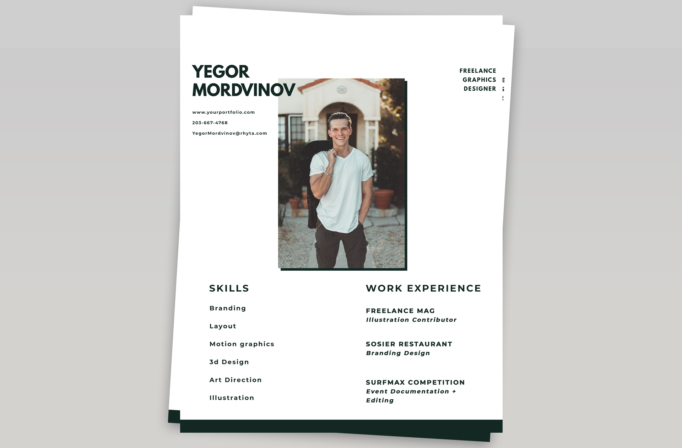
Free Photoshop Resume Template 7 is a spacious, portfolio-minded resume built around a large lifestyle portrait. Its oversized name, deep forest-green accents, and abundant white space give it a youthful editorial look. The design fits freelance graphic designers, photographers, art directors, and multidisciplinary creatives who want their image and personal brand to lead the page.
Design details
- A large vertical portrait placed near the center, framed by a subtle dark green offset shadow
- An oversized two-line name in the upper-left corner with website, phone, and email directly below
- A compact stacked job-title treatment at the upper right, balancing the name across the page
- Two roomy lower columns for skills and work experience
- Heavy uppercase sans serif headings paired with smaller letter-spaced copy and italic role descriptions
- A dark green band along the bottom that acts as a strong visual finish
This layout favors impact over information density. The large photograph occupies the visual center, so the page feels closer to a magazine profile or creative portfolio cover than a conventional corporate resume. Minimal color and simple type keep the bold composition controlled rather than busy.
How to use it
- Download the ZIP and open the included PSD in Photoshop.
- Replace the main photo with a high-resolution vertical portrait that has room around the subject.
- Update the oversized name and contact block, checking carefully for line wraps.
- Choose five or six focused skills and two or three selected projects or roles for the lower columns.
- Keep descriptions short so the generous negative space remains part of the design.
- Export a PDF for direct applications or a JPG for a portfolio and social preview.
Download
Download free-photoshop-resume-template-83.zip“>Download resume7.zip
Related templates
Find advice on shaping concise resume content in the resume hub, then use the branding guide to coordinate your photo, type, and portfolio.
FAQ
Can I edit this resume in Photoshop?
Yes. You can replace the portrait, change the green accents, and rewrite all text in the PSD.
What should I change first?
Choose the portrait first. Its lighting and colors will guide any changes you make to the accent bar and typography.
Can I use it for job applications today?
Yes, especially for creative hiring managers, freelance pitches, and portfolio introductions. Use a simpler companion resume when photo-based layouts are discouraged.








