
What this template is for
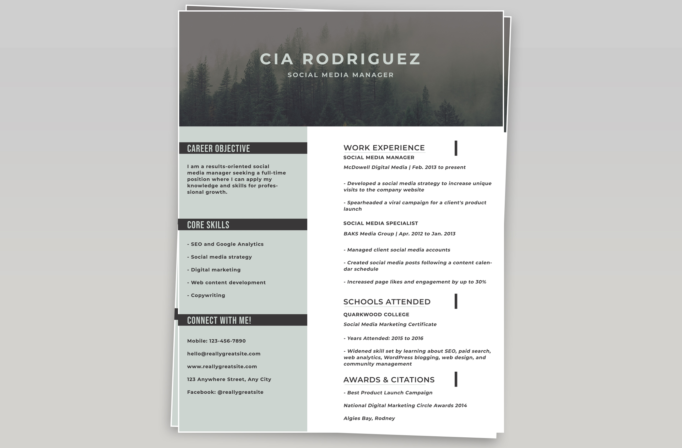
Free Photoshop Resume Template 6 combines an atmospheric forest header with a practical two-column career layout. The muted gray, charcoal, and pale sage palette gives it a calm, grounded character, while bold section bars keep the information direct. It is especially fitting for social media managers, content strategists, nonprofit communicators, and outdoor or sustainability brand marketers.
Design details
- A full-width misty evergreen photograph with the candidate name and job title centered in spaced white capitals
- A pale gray-green left sidebar for the career objective, core skills, and contact details
- Dark charcoal title bars across the sidebar that create strong, quick-scanning anchors
- A wide white main column for work experience, education, and awards
- Large uppercase sans serif headings paired with italic organization and date lines
- Small vertical black markers beside the main section headings for an editorial accent
The template balances visual atmosphere with plenty of room for written achievements. Its header makes an immediate brand statement, but the lower page remains clear and conventional. The preview also uses a stacked-paper presentation effect, while the actual resume itself stays rectangular and easy to export.
How to use it
- Download the ZIP file and open the PSD in Photoshop.
- Keep the forest image for an outdoors-oriented tone, or replace it with a wide image that remains legible under white type.
- Rewrite the objective as a concise professional summary and limit the sidebar skills to your strongest capabilities.
- Use the main column for reverse-chronological roles with measurable results, followed by education and selected recognition.
- Check the contrast of any replacement header image, then export a high-quality PDF.
Download
Download free-photoshop-resume-template-72.zip“>Download resume6.zip
Related templates
Use the resume hub to refine your achievements and the branding guide to choose a header image that supports your professional story.
FAQ
Can I edit this resume in Photoshop?
Yes. The source lets you update the background photo, colors, typography, and every content area.
What should I change first?
Start with the name, title, and header image because they set the mood, then tailor the work results in the main column.
Can I use it for job applications today?
Yes. It is well suited to direct PDF submissions and networking, particularly when visual branding matters to the position.








