
What this template is for
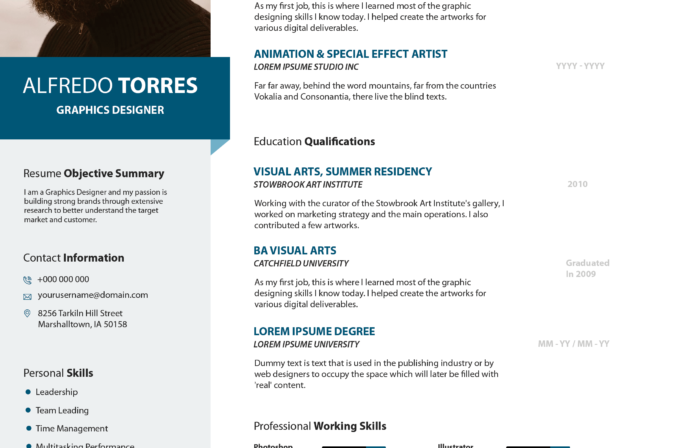
Free Photoshop Resume Template 59 is a bold two-column resume for creative professionals who want a polished portfolio feel without sacrificing practical detail. Its strong color blocking and generous content areas suit graphic designers, illustrators, and creative marketing specialists who need to show experience, software skills, and personality on one page.
Design details
- A large landscape portrait fills the upper-left corner, while a warm golden-orange name panel occupies the upper-right for an immediate, editorial-style introduction.
- The tall deep teal sidebar groups the profile, contact information, personal skills, and social links in white type, creating a clear contrast with the white main column.
- An elegant high-contrast serif gives the oversized name a refined fashion-magazine feel, while condensed sans serif headings and bold labels keep the detailed sections easy to scan.
- Orange headings, fine gray divider rules, horizontal skill bars, square software ratings, and simple hobby icons create a consistent visual system throughout the page.
- The main column gives substantial space to three work entries, education, software proficiency, and interests, making the design useful for applicants with a developed career history.
How to use it
- Download the ZIP file and open the PSD source in Photoshop.
- Replace the wide header photograph with a sharp side-profile or environmental portrait that still reads clearly beneath the left-side crop.
- Update the name, role, profile, experience, education, contact details, social profiles, and skill labels. Keep descriptions concise so the airy spacing remains intact.
- Adjust the teal and orange accent colors if needed, then review the bars and rating squares so they accurately reflect your abilities.
- Export a high-resolution PDF for applications and a JPG for portfolio previews or social sharing.
Download
Download free-photoshop-resume-template-71.zip“>Download resume59.zip
Related templates
Explore the resume hub for application advice, or use the branding guide to coordinate the teal, orange, photography, and typography with your portfolio.
FAQ
Can I edit this resume in Photoshop?
Yes. The PSD format lets you replace text and photography, recolor the major panels, and customize the visual skill indicators in Photoshop.
What should I change first?
Begin with the header portrait and oversized name because they establish the design’s identity. Then edit the sidebar and shorten each experience description to fit its allotted block.
Can I use it for job applications today?
Yes, especially for direct applications to design studios, creative agencies, and in-house brand teams. Because the layout is highly visual, also keep a simpler text-based version available when an employer requires automated form parsing.








