
What this template is for
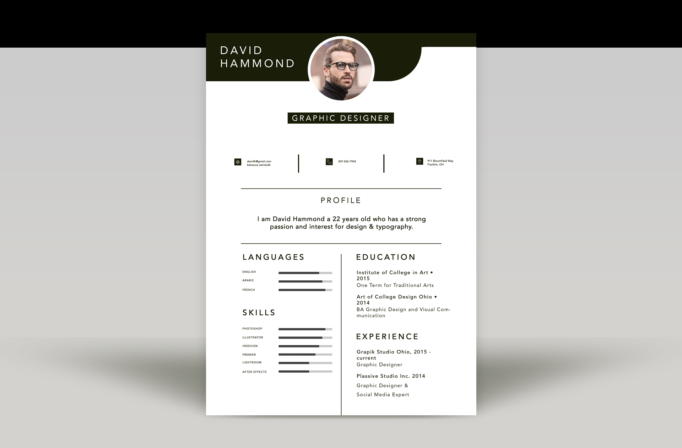
Free Photoshop Resume Template 4 presents a clean, structured resume with a strong personal header and a restrained black, white, and dark olive palette. Its orderly grid feels professional while the circular portrait and sculpted header add just enough visual character. It is a natural choice for graphic designers, junior art directors, and visual communication graduates who want a creative resume that still reads as organized and businesslike.
Design details
- A wide dark header with the candidate name aligned left and a circular portrait centered over the lower edge
- A compact role label set in white uppercase type inside a dark rectangular badge
- A three-part contact row with small square icons and vertical dividers for email, phone, and location
- A centered profile statement separated by fine horizontal rules
- A balanced lower two-column layout with languages and skills on the left, education and experience on the right
- Horizontal proficiency bars that make language and software abilities easy to compare
The typography combines widely spaced uppercase headings with approachable sans serif body copy. Rounded shapes in the header soften the otherwise precise geometry, while generous white space prevents the page from feeling crowded. The result has a modern studio aesthetic without relying on bright color or decorative illustrations.
How to use it
- Download the ZIP and open the PSD source in Photoshop.
- Replace the circular headshot with a closely cropped portrait that has a simple background.
- Update the contact row and keep each item short enough to preserve the three-column alignment.
- Edit the profile, education, and experience blocks, then adjust the proficiency bars to reflect your actual skills.
- Export a print-ready PDF and check that all small text remains readable at 100 percent size.
Download
Download free-photoshop-resume-template-50.zip“>Download resume4.zip
Related templates
Visit the resume hub for guidance on content, then consult the branding guide if you plan to match this monochrome look to a portfolio.
FAQ
Can I edit this resume in Photoshop?
Yes. The PSD lets you change the portrait, copy, colors, section labels, and visual skill bars.
What should I change first?
Replace the headshot and name first, then tailor the short profile and experience entries to the role you want.
Can I use it for job applications today?
Yes. It is ready for a polished PDF submission once personalized, though a text-first alternative may be useful for strict application systems.








