
What this template is for
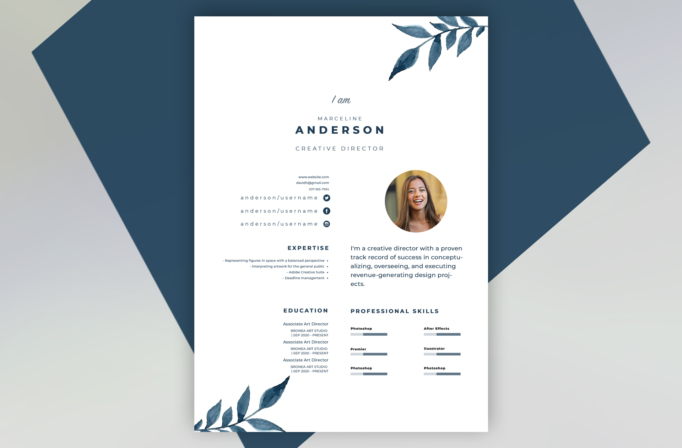
Free Photoshop Resume Template 35 is a refined one-page resume for creative professionals who want a personal, polished presentation without a rigid corporate look. Its airy composition and hand-painted botanical details make it especially fitting for an art director, brand designer, or boutique creative consultant. The design feels calm and distinctive while leaving plenty of white space around the information.
Design details
- A bright white page with deep navy-blue text and watercolor leaf illustrations in the upper-right and lower-left corners
- A centered introduction with a small script phrase, widely spaced first name, bold uppercase surname, and understated job title
- A circular portrait placed beside a short personal statement, creating a friendly focal point in the middle of the page
- A compact two-column lower section for expertise, education, and professional skill bars
- Small website, email, phone, and social profile details arranged neatly without competing with the main headline
The combination of watercolor foliage, generous margins, and precise sans serif typography creates an elegant editorial mood. It works best when the content is concise. The skills area uses slim horizontal meters, while the experience or education copy is kept visually light so the decorative leaves remain part of the composition rather than mere background accents.
How to use it
- Download the ZIP file and open the PSD source in Photoshop.
- Replace the circular portrait with a clear headshot, keeping the face centered within the crop.
- Update the name, creative title, contact links, expertise, education, and introductory statement.
- Keep descriptions short enough to preserve the open white space and balanced two-column layout.
- Adjust the navy color or watercolor artwork only if needed, then export a high-resolution PDF for applications and a JPG for previews.
Download
Download free-photoshop-resume-template-45.zip“>Download resume35.zip
Related templates
Explore the resume hub for application tips, or use the branding guide to coordinate the navy palette, portrait, and typography with your portfolio.
FAQ
Can I edit this resume in Photoshop?
Yes. You can replace the text and portrait, recolor the type and skill bars, and adapt the decorative elements in Photoshop.
What should I change first?
Start with the portrait and centered name block because they establish the design’s personality. Then shorten your summary and select only the strongest skills and credentials.
Can I use it for job applications today?
Yes. It is well suited to direct applications, portfolio introductions, and creative networking. Export a PDF with selectable text when possible, and keep a simpler version available if an employer requests an ATS-focused resume.








