
What this template is for
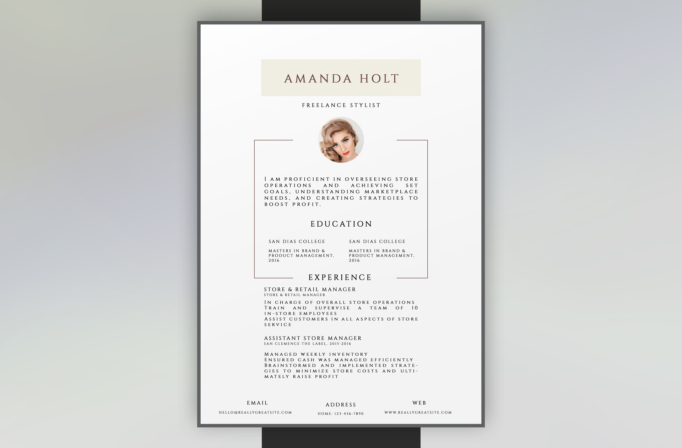
Free Photoshop Resume Template 32 is an elegant, centered resume designed like a fashion editorial page. A warm cream name card, refined serif capitals, muted rose rules, and a circular beauty portrait create a polished personal presentation. The layout is a strong fit for freelance stylists, boutique managers, beauty professionals, and luxury retail applicants whose work benefits from a sophisticated but quiet visual identity.
Design details
- A broad white page is enclosed by a substantial charcoal border, producing a framed portfolio effect.
- The name appears in widely spaced burgundy serif type on a soft cream rectangle, with the role centered beneath.
- A circular portrait overlaps a pair of fine rose-colored bracket lines that organize the central content.
- The summary, education, and experience follow a symmetrical single-axis composition with carefully spaced uppercase lettering.
- Three small contact blocks for email, address, and web sit evenly across the bottom, completing the formal layout.
How to use it
- Download the ZIP file and open the resume PSD in Photoshop.
- Replace the circular portrait with a clean editorial headshot whose colors complement the cream and muted rose palette.
- Edit the name, title, profile, education, experience, and three contact blocks, keeping the copy concise enough to preserve the symmetry.
- Use the paired education columns for two qualifications, specialties, or certifications, and reserve the lower section for your most relevant roles.
- Review the widely tracked text at actual size, then export a high-quality PDF for email or printing.
Download
Download free-photoshop-resume-template-42.zip“>Download resume32.zip
Related templates
Use the resume hub to strengthen the experience copy, then consult the branding guide to coordinate the portrait, cream panel, and rose accent.
FAQ
Can I edit this resume in Photoshop?
Yes. You can replace the portrait, rewrite all content, change the border and rule colors, and adjust the serif typography in the PSD.
What should I change first?
Begin with the portrait and name card because they establish the mood. Next, shorten the profile and role descriptions until the centered composition feels balanced rather than crowded.
Can I use it for job applications today?
Yes, particularly for fashion, beauty, hospitality, and premium retail roles. Send it as a PDF where visual presentation matters, and keep a plain text version available for automated application portals.








