
What this template is for
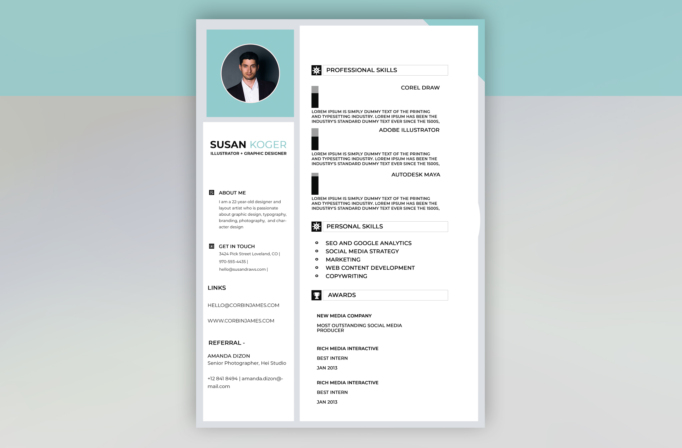
Free Photoshop Resume Template 30 is a clean two-panel resume with a pale aqua portrait header and a generous white skills area. The compact left rail holds identity, contact information, links, and a reference, while the wider right panel emphasizes professional skills, personal strengths, and awards. Its bright, organized presentation suits illustrators, junior graphic designers, digital marketers, and creative assistants who need to summarize varied capabilities quickly.
Design details
- A circular professional portrait sits inside a large aqua square at the top of the narrow left column.
- The name combines bold black type with a light aqua surname, followed by a compact uppercase role line.
- The main panel uses outlined section bars, black square icon tabs, and plenty of white space.
- Professional tools are displayed with small vertical two-tone indicators and centered software names.
- A bulleted personal-skills list and stacked award entries make the lower page easy to scan, while light gray framing adds structure.
How to use it
- Download the ZIP file and open the source PSD in Photoshop.
- Replace the circular headshot, then update the name, creative title, short biography, contact details, links, and referral.
- Rename the software headings and rewrite each description to explain how you use that tool rather than repeating a generic proficiency claim.
- Tailor the personal skills and awards to the target role, removing any sections that cannot be supported with real examples.
- Preserve the aqua, black, white, and gray contrast or substitute one consistent brand color before exporting a PDF.
Download
Download free-photoshop-resume-template-40.zip“>Download resume30.zip
Related templates
The resume hub can help you refine the content, while the branding guide offers direction for customizing the aqua accent and visual hierarchy.
FAQ
Can I edit this resume in Photoshop?
Yes. The photo, colors, icons, text, indicators, and panel backgrounds can all be adapted in the PSD.
What should I change first?
Begin with the portrait and name block, then replace every placeholder paragraph. The professional-skill descriptions occupy the most space, so edit them early and keep each one focused.
Can I use it for job applications today?
Yes. It is especially appropriate for creative or marketing applications sent directly by email. Export it as a clear PDF, and consider a text-first alternative when uploading to strict applicant tracking systems.








