
What this template is for
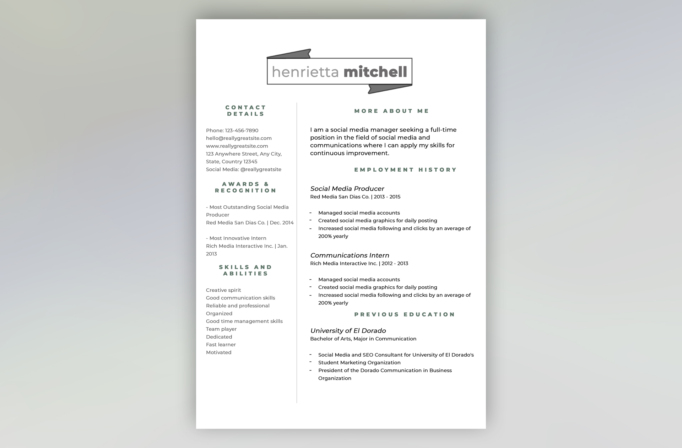
Free Photoshop Resume Template 27 is a restrained, editorial resume for applicants who want personality without sacrificing clarity. Its slim two-column format keeps supporting information on the left and gives the wider right column to the profile, employment history, and education. The design is especially fitting for social media managers, communications specialists, and marketing coordinators whose experience should remain the focus.
Design details
- A white page with a soft gray divider creates a calm, spacious two-column layout.
- The name sits inside a thin outlined label, accented by folded charcoal ribbon shapes above and below.
- Muted sage green, widely spaced uppercase headings organize contact details, awards, skills, profile, employment, and education.
- Clean sans serif body text is paired with italic job and school names for a subtle editorial contrast.
- The design is text-led and contains no portrait, making it useful when you prefer a photo-free application.
How to use it
- Download the ZIP file and open the PSD source in Photoshop.
- Replace the name first, then edit the profile and chronological experience in the broad right column.
- Use the narrow left column for concise contact details, selected recognition, and a focused list of abilities.
- Keep the sage and charcoal palette for an understated look, or recolor the headings and ribbon accents to suit your field.
- Check line breaks at full size, then export a high-quality PDF for applications and a JPG for quick previews.
Download
Download free-photoshop-resume-template-36.zip“>Download resume27.zip
Related templates
Browse the resume hub for practical content guidance, then use the branding guide to adapt the muted colors and typography to your professional identity.
FAQ
Can I edit this resume in Photoshop?
Yes. The PSD is intended for editing in Photoshop, including the text, colors, spacing, headings, and ribbon-style name treatment.
What should I change first?
Start with the name box because long names may require a smaller type size. Next, replace the profile and work history, then shorten the left-column material until it stays airy and easy to scan.
Can I use it for job applications today?
Yes. It works particularly well for communications, content, and marketing applications. Since the visual layout uses columns, export a polished PDF and keep a simpler text version available for application systems that request pasted content.








