
What this template is for
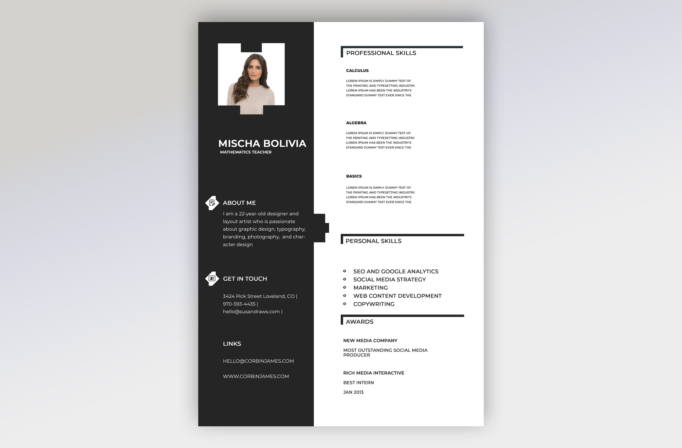
Free Photoshop Resume Template 25 is a stark black-and-white resume with a portrait-led sidebar and a skills-focused main panel. Although the sample is presented for a mathematics teacher, the layout also fits tutors and academic support specialists who want to organize subject strengths clearly. With rewritten headings, it could serve a trainer or entry-level analyst whose abilities and awards matter more than a long employment timeline.
Design details
- A tall charcoal sidebar occupying roughly two-fifths of the page, paired with an uncluttered white content column
- A rectangular portrait near the top, framed by stepped white geometric tabs that repeat as a decorative notch along the column edge
- A large bold uppercase name and smaller mathematics-teacher title set in white beneath the photo
- Sidebar sections for About Me, Get in Touch, and Links, each arranged with generous vertical spacing and simple white icons
- Thin black bracket-like rules introducing Professional Skills, Personal Skills, and Awards in the main column
- Three subject-specific skill blocks with bold labels and short descriptions, followed by a concise bulleted skill list and award entries
The design is monochrome, direct, and highly structured. It avoids decorative color and instead creates hierarchy through contrast, bold sans serif type, and strong horizontal rules. The open right column gives each subject area room to breathe, while the dark sidebar anchors identity and contact information. Since there is no dedicated work-history section in the sample, this template is strongest for skills-led introductions, teaching portfolios, or early-career applications.
How to use it
- Download the ZIP file and open the PSD source in Photoshop.
- Replace the portrait, then update your name, teaching title, summary, contact details, email, and website.
- Rename the three professional-skill blocks for the subjects or competencies most relevant to the position.
- Replace placeholder paragraphs with concise evidence, such as grade levels taught, curriculum areas, results, certifications, or classroom methods.
- Proof the white sidebar text and export a high-quality PDF or JPG.
Download
Download free-photoshop-resume-template-34.zip
Related templates
The resume hub offers guidance for stronger resume content, and the branding guide can help you adapt the monochrome look for a teaching portfolio.
FAQ
Can I edit this resume in Photoshop?
Yes. You can replace the photo, edit the subject labels and copy, change the monochrome palette, and update every contact field.
What should I change first?
Begin with the portrait and role title, then turn the placeholder skill descriptions into specific evidence of your teaching or training ability.
Can I use it for job applications today?
Yes, particularly for portfolio-led or early-career applications. Add work history if the employer expects a conventional chronological resume.








