
What this template is for
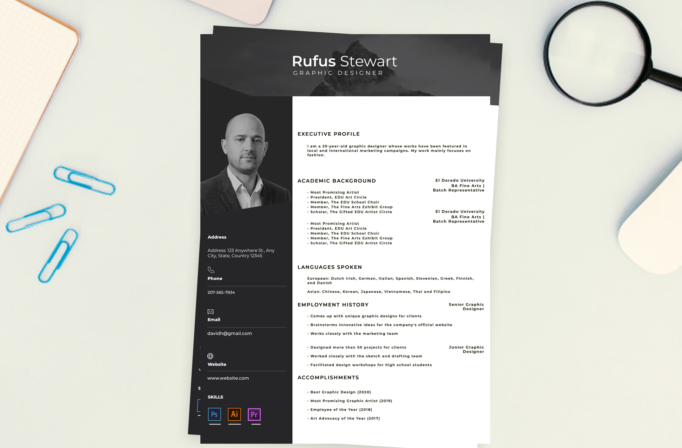
Free Photoshop Resume Template 20 is a polished monochrome resume built around a strong professional portrait and a structured two-column page. Its restrained black, charcoal, and white palette suits graphic designers, art directors, and photographers who want a serious creative presentation. It can also work for architects or agency professionals whose applications benefit from a refined personal image and clearly grouped credentials.
Design details
- A dark full-width header with a mountain photograph, translucent overlays, and a centered name set in contrasting bold and light sans serif weights
- A charcoal sidebar occupying roughly one-third of the page, containing a large grayscale portrait, contact information, divider lines, and software badges
- A bright white main column with executive profile, academic background, languages, employment history, and accomplishments
- Compact uppercase headings and heavily tracked body type that create a technical, portfolio-like mood
- Right-aligned school and job titles that sit opposite descriptive bullet lists, giving each entry a clear visual anchor
- Minimal line icons for phone, email, and website, plus colored Photoshop, Illustrator, and Premiere-style skill tiles at the bottom of the sidebar
The template has a confident editorial look, with the portrait and dark sidebar providing most of its visual weight. The landscape banner adds atmosphere without introducing color, while the small software accents bring a controlled touch of blue, orange, and purple. The dense letter spacing is distinctive, so longer copy should be edited carefully rather than reduced to an unreadable size.
How to use it
- Download the ZIP file and open the PSD in Photoshop.
- Replace the header image and portrait with high-resolution photos, keeping the portrait crop close enough to remain recognizable.
- Update your name, title, contact details, profile, education, languages, roles, and accomplishments.
- Customize the software tiles to reflect tools you genuinely use, and shorten bullet points to preserve the clean right column.
- Review contrast and alignment, then export a PDF for applications or a JPG for an online portfolio.
Download
Download free-photoshop-resume-template-29.zip“>Download resume20.zip
Related templates
Visit the resume hub for content advice and the branding guide for help matching the photo treatment to your portfolio.
FAQ
Can I edit this resume in Photoshop?
Yes. You can replace both photographs, edit all text, change the charcoal panels, and revise the software badges in Photoshop.
What should I change first?
Begin with the portrait and name, then rewrite the profile and employment history. These elements establish both the identity and hierarchy of the page.
Can I use it for job applications today?
Yes. It is particularly effective for emailed applications and creative interviews. Keep a plain text version available for portals that parse resumes automatically.








