
What this template is for
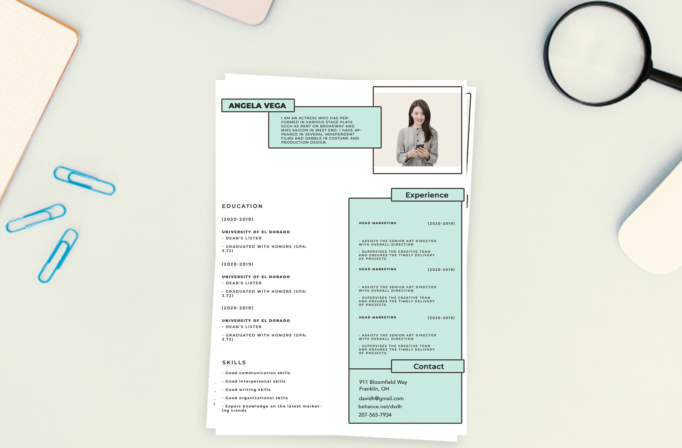
Free Photoshop Resume Template 17 is a playful modular resume that uses outlined boxes and pale mint panels to turn standard career information into a tidy visual system. A small cutout portrait, floating nameplate, profile card, large experience panel, and separate contact block overlap in a deliberate collage. It is a fitting choice for marketing coordinators, social media specialists, and junior brand designers who want an approachable alternative to a conventional corporate resume.
Design details
- A clean white page with mint-green content cards framed by bold dark outlines
- A rectangular portrait zone in the upper right, designed for a cutout or simple studio image
- Overlapping horizontal labels for the candidate name, experience, and contact details, balanced by a left column for education and a compact list of practical skills
- A tall mint experience box with room for three roles, followed by a matching contact card and generous open space around the modules
How to use it
- Download the ZIP file and open the PSD source in Photoshop.
- Replace the portrait with a clean waist-up or head-and-shoulders image. A neutral background will blend most naturally into the photo card.
- Rewrite the short profile, then update the overlapping name label with your own identity.
- Add education and skill details on the left, and summarize up to three relevant roles inside the mint experience panel. Replace every contact field, check that text stays within the outlined cards, and export a PDF. Preserve the friendly, youthful mood created by plain black sans serif type, soft mint color, and deliberately open modular composition.
Download
Download free-photoshop-resume-template-25.zip“>Download resume17.zip
Related templates
Explore the resume hub for writing guidance, and use the branding guide when adapting the mint cards and outlined visual language.
FAQ
Can I edit this resume in Photoshop?
Yes. You can change the portrait, mint fills, border weights, label positions, typography, and every text field in Photoshop.
What if I need more experience entries?
Shorten each description or reduce vertical spacing carefully. Avoid shrinking the type so far that the right panel becomes difficult to read.
Which roles suit this look?
The approachable modular style works well for marketing, communications, community management, and junior creative roles.








