
What this template is for
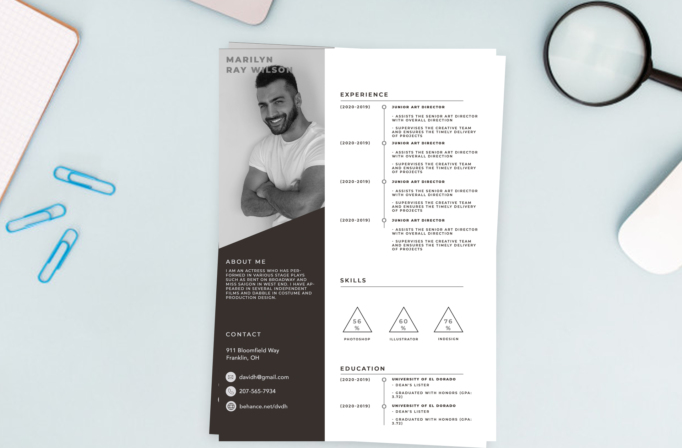
Free Photoshop Resume Template 15 is a sophisticated monochrome resume that pairs an oversized black-and-white portrait with a spacious timeline layout. The dark left rail presents the candidate’s personality and contact details, while the white right panel carries experience, skill percentages, and education. It is a strong option for photographers, art directors, stylists, and creative consultants who want a personal, editorial application with a restrained color palette.
Design details
- A tall grayscale portrait occupying the upper portion of the left column, with the candidate name placed over the image
- A diagonal transition from the photograph into a deep brown-black sidebar for the about and contact sections
- A wide white content panel using thin gray rules and vertical timelines for experience and education
- Triangular skill graphics for software percentages, paired with uppercase sans serif typography, generous tracking, compact text, and abundant white space
How to use it
- Download the ZIP file and open the PSD source in Photoshop.
- Insert a tall, high-contrast portrait and convert it to grayscale if needed. Check that the name remains legible over the image.
- Replace the about paragraph and contact details in the dark sidebar, keeping the copy compact.
- Update the experience and education timelines, then change the skill names and percentages to honest measures you can discuss in an interview. Export a high-quality PDF and review the smallest text at actual size. Preserve the polished, fashion-forward mood created by the cohesive black, white, and warm-charcoal palette and angled photo crop.
Download
Download free-photoshop-resume-template-23.zip
Related templates
Read the resume hub for application tips, and consult the branding guide to align the portrait and monochrome styling with your portfolio.
FAQ
Can I edit this resume in Photoshop?
Yes. The portrait, dark panel, timelines, triangle graphics, type, and all written content can be customized in Photoshop.
Does the photo need to be black and white?
No, but grayscale supports the template’s refined mood and helps the typography and timeline details remain the focus.
Who is this template best for?
It suits photographers, stylists, art directors, and other image-conscious professionals applying directly to people who value visual presentation.








