
What this template is for
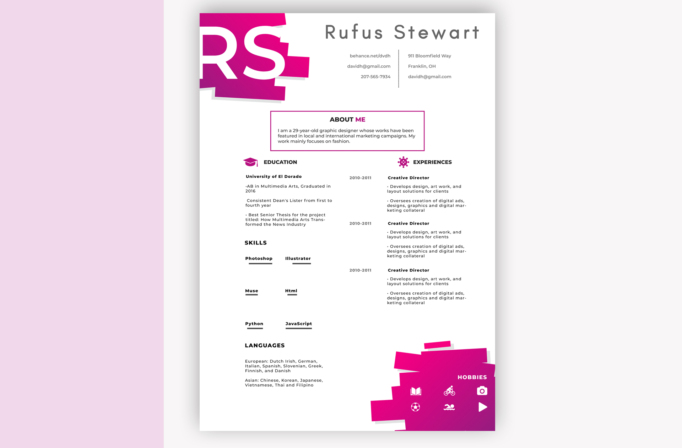
Free Photoshop Resume Template 19 is a bold, portfolio-minded resume for creative applicants who want their page to feel energetic without losing a clear reading order. The hot pink and magenta artwork makes it especially fitting for graphic designers, fashion creatives, and advertising or social media specialists. It can also suit an illustrator with a playful personal brand. This is a presentation-first design, best used when visual personality matters as much as conventional resume structure.
Design details
- A mostly white single-page canvas with oversized cropped initials layered over angular magenta shapes in the upper-left corner
- A widely tracked gray nameplate across the top, followed by two compact contact columns divided by a dotted vertical rule
- A centered About Me box outlined in pink, creating a clear introduction before the page splits into education and experience columns
- Black geometric sans serif type, small bold labels, magenta section icons, and generous white space for a crisp editorial feel
- A left column for education, skills, and languages, with a wider right column for three experience entries and dates
- A large layered magenta block in the lower-right corner that contains white hobby icons and balances the initials at the top
The layout feels youthful, fashion-forward, and deliberately graphic. Its skills area uses short underlines instead of charts, while the hobby panel relies on pictograms for fast visual scanning. Because some decorative blocks sit close to the page edges, keep the original canvas size and check margins before printing.
How to use it
- Download the ZIP file and open the PSD source in Photoshop.
- Replace the large initials, name, contact details, profile, education, experience, skills, languages, and hobbies with your own information.
- Keep descriptions concise so the airy two-column composition remains balanced. Swap the hobby symbols only for icons that match your interests.
- Adjust the pink gradient and gray typography if needed, then proof small text at 100 percent size.
- Export a high-quality PDF for applications and a JPG for portfolio previews or social sharing.
Download
Download free-photoshop-resume-template-27.zip
Related templates
Browse the resume hub for practical application guidance, or use the branding guide to coordinate the magenta palette with your portfolio.
FAQ
Can I edit this resume in Photoshop?
Yes. The PSD lets you replace text, recolor the graphic blocks, update icons, and personalize the oversized initials.
What should I change first?
Start with the initials and name because they define the composition. Next, revise the profile and experience copy so it fits the existing text areas cleanly.
Can I use it for job applications today?
Yes, particularly for creative roles and direct submissions. For automated application portals, consider pairing it with a simpler text-based resume.








