
What this template is for
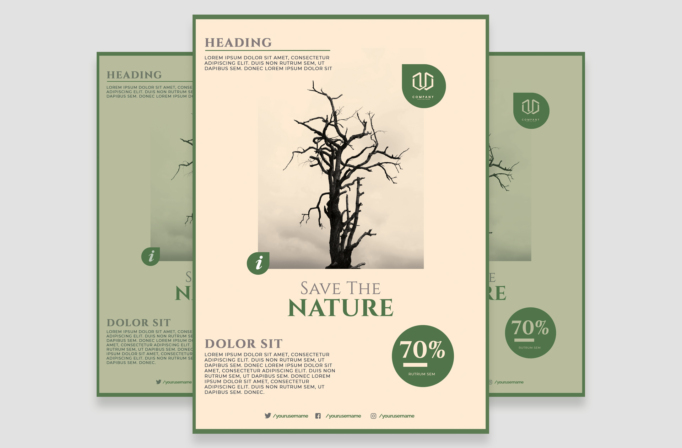
Free Brochure and Book Cover Photoshop Template 98 actually presents a vertical environmental awareness flyer built around the message “Save the Nature.” Its calm editorial treatment is a strong fit for a conservation campaign, an Earth Day event, or a nonprofit sustainability report launch. The composition gives one atmospheric photograph the leading role while leaving clear areas for a campaign headline, a short introduction, supporting copy, a logo, social handles, and a prominent statistic.
Design details
- A warm cream background framed by a narrow forest green border, creating a natural, understated palette.
- A large central photo zone featuring a bare tree against a misty neutral sky, with room to replace it with wildlife, landscape, climate, or restoration photography.
- Classic serif display type for “Save the Nature,” section headings, and the oversized “70%” statistic, paired with compact uppercase sans serif body copy.
- A green circular information badge overlapping the image and a matching rounded brand mark in the upper right.
- A structured vertical hierarchy with introductory copy at the top, the hero image in the middle, the campaign statement below it, and supporting details near the foot.
The muted photography, generous spacing, and restrained green accents produce a thoughtful, slightly somber mood. It feels more like an advocacy or public-interest campaign than a commercial sales flyer, making the design especially suitable for serious ecological subjects.
How to use it
- Download the ZIP file and open the source file in Photoshop.
- Replace the tree photograph with a high-resolution vertical image that leaves enough quiet space around the subject.
- Update the main message, statistic, explanatory paragraphs, logo, and social media names with verified campaign information.
- Keep the cream and green palette for an organic tone, or sample two restrained colors from your chosen photograph.
- Proof the small body text at actual print size, then export a print-ready version and a separate web image.
Download
Download free-brochure-and-book-cover-photoshop-template-52.zip“>Download Flyer-Design-Template-98.zip
Related templates
Browse the best flyer templates roundup for more campaign layouts, or visit the business flyer hub for editable promotional alternatives.
FAQ
What kind of campaign suits this design?
It works best for conservation appeals, tree-planting drives, Earth Day programs, and environmental impact announcements.
What photo will work best?
Choose a portrait-oriented image with a distinct central subject and soft or uncluttered surroundings so the editorial layout remains calm.
Can I replace the 70% figure?
Yes. Replace it with a concise, properly sourced statistic and keep the figure short enough to remain legible inside the circle.







