What this template is for
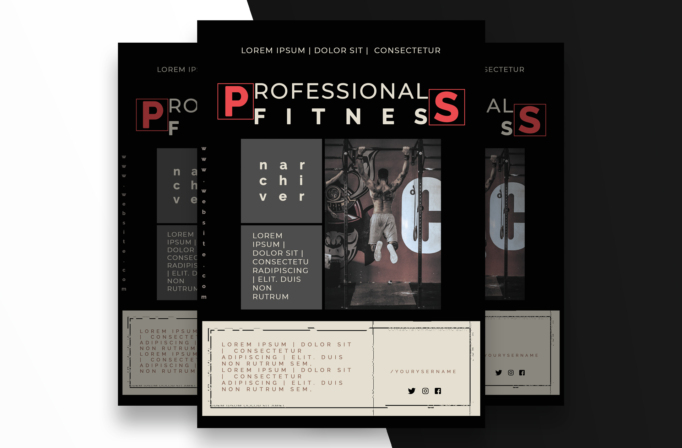
Free Fitness Flyer Template for Personal Trainers and Gyms is shown as an intense professional fitness promotion rather than a general brochure. Its gritty gym image, modular grid, and oversized spaced lettering suit a personal trainer, strength studio, CrossFit-style event, or membership campaign. The restrained colors and industrial composition create a disciplined, premium mood aimed at serious training rather than casual wellness.
Design details
- A nearly black background establishes the dramatic base, with charcoal modules, warm off-white text, and selective red accents.
- The headline stretches across the top, turning the first and final letters into red boxed graphic elements.
- Wide letter spacing gives “Professional Fitness” a modern, athletic identity with a strong horizontal rhythm.
- A central monochrome action photo shows an athlete performing a pull-up inside an urban gym.
- Stacked gray panels at left provide areas for a trainer name and short program information.
- A large cream footer card contains extended copy, a social username, and compact social icons within a technical border treatment.
How to use it
- Download the archive and open the PSD in Photoshop.
- Swap in a high-contrast action photograph with the athlete centered and enough surrounding space for the crop.
- Replace the trainer name, program description, website, social handle, and headline while respecting the narrow text boxes.
- Use the red accent for a key letter, date, price, or call to action, keeping the rest of the palette subdued.
- Export a high-resolution print file for gym display and a resized digital edition for membership promotion.
Download
Download free-brochure-and-book-cover-photoshop-template-39.zip
Related templates
Find additional bold compositions in the best flyer templates roundup and more editable campaigns in the business flyer hub. If you want a second fitness layout to compare, the fitness gym flyer template uses a lighter, offer-led style.
FAQ
What kind of photo should replace the sample?
Use a sharp training image with a clear full-body action, controlled lighting, and a dark background that blends naturally into the layout.
Is the design suitable for a class schedule?
Yes. The gray modules can hold short class names or session times, while the cream footer can carry booking details and conditions.
Can I use brighter colors?
You can, but one concentrated accent color preserves the tough, focused character better than a multicolor palette.
This piece is part of Free flyer templates.