
What this template is for
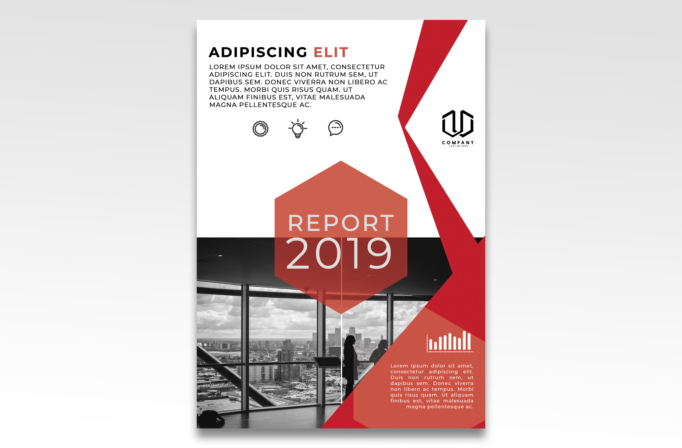
Free Brochure and Book Cover Photoshop Template 83 is shown as a modern annual report cover built around a city-office photograph and sharp red geometry. It has the serious, analytical tone needed for a company performance report, investor update, or consulting research publication. The cover also adapts naturally to a business proposal when the central year is replaced with a project name or issue number.
Design details
- A white upper field leaves generous space for an introductory heading, compact summary copy, three small line icons, and a logo.
- Black sans serif text is paired with muted coral and vivid red accents for a clear editorial hierarchy.
- A translucent coral hexagon anchors the center with the large “Report 2019” title in light, narrow lettering.
- The lower half uses a monochrome office-interior photograph with windows overlooking a city skyline.
- A dramatic red angular band cuts down the right side and points toward the central title and photograph.
- A coral information panel at bottom right holds a simple white chart icon and a short supporting paragraph.
How to use it
- Download the ZIP and open the source design in Photoshop.
- Change the year, report label, introductory paragraph, logo, and supporting copy to match your publication.
- Replace the office image with a high-resolution workplace, headquarters, infrastructure, or team photograph.
- Update the icons and mini chart so they reflect the report topic, such as growth, sustainability, operations, or market research.
- Check that the image remains readable beneath the translucent shapes, then export at the required print dimensions.
Download
Download free-brochure-and-book-cover-photoshop-template-37.zip“>Download Flyer-Design-Template-83.zip
Related templates
See the best flyer templates roundup for more cover ideas and the business flyer hub for adaptable company materials.
FAQ
Is this better for a flyer or a report cover?
The preview is most convincing as a report, white paper, or proposal cover because it prioritizes a publication title, year, and corporate summary.
Can the red palette be changed?
Yes. Replace the coral and red shapes with your brand colors while preserving contrast against the white field and grayscale photograph.
What photo works best?
Choose an image with strong horizontal or architectural lines and enough dark detail to support the light title overlay.







