
What this template is for
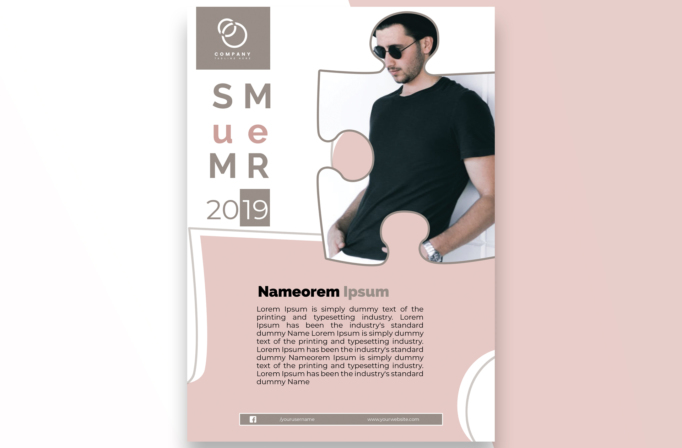
Free Brochure and Book Cover Photoshop Template 81 actually shows a pastel summer menswear flyer with a single large lifestyle portrait framed by interlocking puzzle shapes. It is a distinctive option for a summer collection release, a casual clothing boutique promotion, or a personal style and model feature. The soft blush pink, warm gray, white space, and relaxed photography create a gentle contemporary mood that feels playful rather than loud.
Design details
- A square taupe logo block sits at the upper-left, separated from the main portrait and surrounded by generous white space.
- The season is arranged vertically as widely spaced letters in alternating taupe and dusty pink. A thin “2019” date overlaps a solid taupe square beneath it.
- The hero photograph fills most of the upper-right area. Its irregular border uses rounded puzzle-piece tabs and sockets outlined in gray, integrating the portrait with the abstract layout.
- A large pale-pink content panel rises from the lower half at a slight angle and includes additional puzzle curves along its top edge.
- The central heading uses bold black type with a gray secondary word, followed by a compact, left-aligned paragraph with comfortable line spacing.
- A slim taupe contact bar along the bottom contains a social profile and website, while partial white circles decorate the lower-right corner.
How to use it
- Download the ZIP file and open the editable PSD source in Photoshop.
- Replace the hero image with a vertical portrait that has a simple background and enough room around the subject for the puzzle-shaped crop.
- Update the stacked season letters, year, and central heading. Use the paragraph for a short collection story, event description, or featured-person introduction.
- Swap the logo, social handle, and website. Match the blush and taupe colors to your clothing line, then inspect every curved mask edge before exporting.
Download
Download free-brochure-and-book-cover-photoshop-template-35.zip“>Download Flyer-Design-Template-81.zip
Related templates
Find more creative portrait layouts in the best flyer templates roundup and explore adaptable retail promotions in the business flyer hub.
FAQ
What kind of photo works in the puzzle frame?
Choose a tall portrait with the subject positioned mostly to the right. Avoid placing the face or key clothing details where the rounded cutouts meet the border.
Can I replace the summer theme?
Yes. Rearrange the stacked letters for another short season or campaign word, and replace the year with a launch date or collection number.
Is the pastel palette required?
No. The shapes can use stronger brand colors, although two coordinated tones plus white will preserve the clean, cohesive appearance.







