
What this template is for
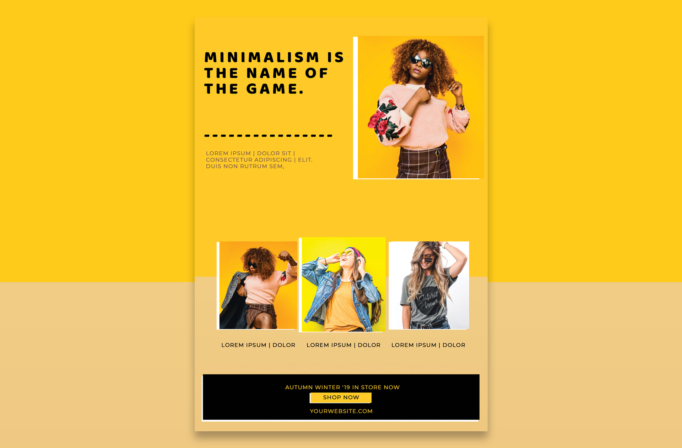
Free Brochure and Book Cover Photoshop Template 74 actually presents a bright fashion retail flyer built around a bold yellow palette and a clean editorial grid. It is a strong choice for a boutique collection launch, a seasonal clothing promotion, or a social campaign for a streetwear and accessories shop. The generous spacing and confident photography give the design an upbeat, youthful mood without making the page feel busy.
Design details
- A saturated golden-yellow background carries through most of the page, with a pale sand-colored lower panel and a solid black call-to-action strip for contrast.
- The upper-left headline uses heavy, widely spaced black capitals over three short lines. A chunky dotted divider and a compact description block create a clear reading order.
- A large portrait zone sits in the upper-right corner. Its white left and bottom rules produce a simple offset-frame effect around the fashion image.
- Three equal square photo zones form a row near the bottom, each paired with a short centered caption. They are well suited to products, outfits, models, or collection categories.
- The footer combines a small seasonal message, a boxed “Shop Now” button, and a website address in yellow and white against black.
How to use it
- Download the ZIP file and open the PSD source in Photoshop.
- Replace the four fashion photographs with images that share similar lighting or background colors. Keep the strongest campaign portrait in the large upper frame.
- Rewrite the headline as a short brand statement, then use the smaller copy for the collection name, dates, or offer details.
- Label the three lower images with useful categories such as New Arrivals, Denim Edit, and Weekend Looks. Update the button and website before exporting.
Download
Download free-brochure-and-book-cover-photoshop-template-28.zip“>Download Flyer-Design-Template-74.zip
Related templates
Browse the best flyer templates roundup for more image-led layouts, or visit the business flyer hub for editable promotional designs.
FAQ
What kind of campaign fits this design?
It works especially well for fashion drops, boutique sales, and lifestyle lookbooks that need one hero image plus three supporting selections.
Which elements should I customize first?
Start with the four photographs and main headline. Then match the yellow background to your brand palette and replace every caption, date, URL, and button label.
Can I adapt the flyer for digital use?
Yes. After editing the portrait layout, export a print-ready version and crop coordinated sections for stories, posts, email banners, or shop announcements.







