
What this template is for
Free Brochure and Book Cover Photoshop Template 72 is a minimalist interior and lifestyle brochure design with a magazine-like hierarchy. It is well suited to an interior designer, furniture showroom, or home styling consultant. The quiet editorial layout could also introduce an architecture portfolio or promote a premium decor collection where photographs and refined typography should lead.
Design details
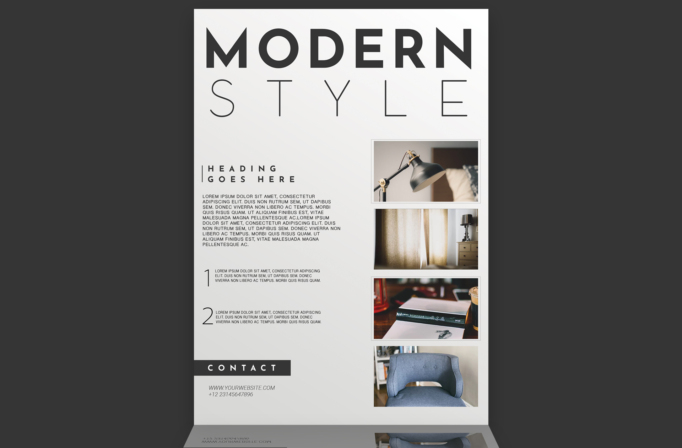
- An oversized “MODERN STYLE” title fills the top, combining a heavy black first line with an extremely light, widely spaced second line.
- The left column holds a small tracked heading, a compact introductory paragraph, and two numbered feature summaries.
- A narrow vertical rule beside the heading creates a subtle editorial marker and reinforces the restrained grid.
- Four framed photographs form a clean column on the right, showing a desk lamp, softly lit curtains, a sketchbook scene, and a modern upholstered chair.
- A charcoal contact tab near the bottom left anchors the website and phone details without introducing a bright accent color.
The nearly monochrome palette of white, black, and soft gray creates a calm, sophisticated mood. Fine typography, broad margins, and carefully separated photo frames resemble a contemporary interiors magazine rather than a loud sales flyer.
How to use it
- Download the ZIP file and open the Photoshop source.
- Replace the four photographs with a coordinated set of room details, furniture pieces, materials, or completed projects.
- Update the oversized title and short introduction to identify your studio, collection, or design concept.
- Use the two numbered sections for signature services, project principles, package highlights, or featured product categories.
- Add your website and phone number, maintain the neutral palette for an editorial finish, and export at the correct size for print or web display.
Download
Download free-brochure-and-book-cover-photoshop-template-26.zip“>Download Flyer-Design-Template-72.zip
Related templates
Best flyer templates roundup and business flyer hub.
FAQ
Can I edit this flyer in Photoshop?
Yes. You can replace each framed image, rewrite the headings and paragraphs, adjust the numbering, and update the contact information.
What should I change first?
Choose four visually consistent interior photos first. Then tailor the large title and numbered copy so they tell one clear design story.
Can I use it for print and social media?
Yes. It works well as a printed portfolio sheet or brochure page, and the title plus photo column can be adapted into elegant social graphics.







