
What this template is for
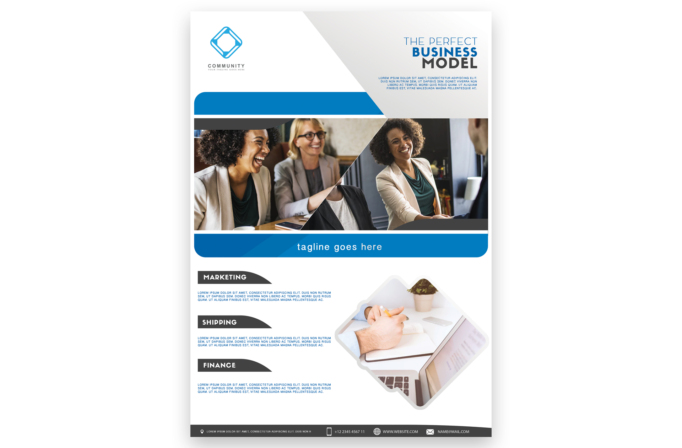
Free Brochure and Book Cover Photoshop Template 71 is a bright corporate brochure layout centered on collaboration and a structured business model. It suits a consulting firm, startup accelerator, or professional community introducing its services. The three labeled content sections and multiple team imagery zones also work well for a financial advisory overview or a concise business-plan cover sheet.
Design details
- A geometric blue logo sits in the open upper-left corner, balanced by a right-aligned “THE PERFECT BUSINESS MODEL” headline.
- A pale diagonal panel crosses the header, directing attention toward the headline and into the photography below.
- The main photo area combines two workplace images with a sharp diagonal split, showing people collaborating and presenting.
- A vivid blue rounded banner beneath the photos provides a centered tagline and visually separates the introduction from the service content.
- Marketing, shipping, and finance appear as three compact modules with dark curved labels, blue body copy, and generous white space.
- A secondary workspace photo is clipped into a rotated rounded square, while a charcoal footer carries address, phone, website, and email details.
The white, blue, and charcoal palette feels dependable and accessible. Rounded corners temper the angular photo split, and uppercase sans serif headings create a clear business hierarchy without making the page feel dense.
How to use it
- Download the ZIP file and open the PSD source in Photoshop.
- Replace the team and desk photographs with images from your company, keeping faces and key objects clear of the diagonal crop lines.
- Update the logo, headline, tagline, and introductory paragraph with your core value proposition.
- Rename the three service modules and add short descriptions for your actual capabilities. Concise copy will preserve the design’s open rhythm.
- Apply your brand colors to the blue bars and accents, verify the footer contact details, and export for print or online distribution.
Download
Download free-brochure-and-book-cover-photoshop-template-25.zip“>Download Flyer-Design-Template-71.zip
Related templates
Best flyer templates roundup and business flyer hub.
FAQ
Can I edit this flyer in Photoshop?
Yes. Photoshop lets you replace all three photo areas, edit the text and logo, recolor the accents, and update the complete contact strip.
What should I change first?
Begin with the business headline and collaborative photos, then rewrite the marketing, shipping, and finance blocks around your real services.
Can I use it for print and social media?
Yes. The full layout works as a one-page company brochure, and the photo banner or individual service modules can be repurposed for social content.







