
What this template is for
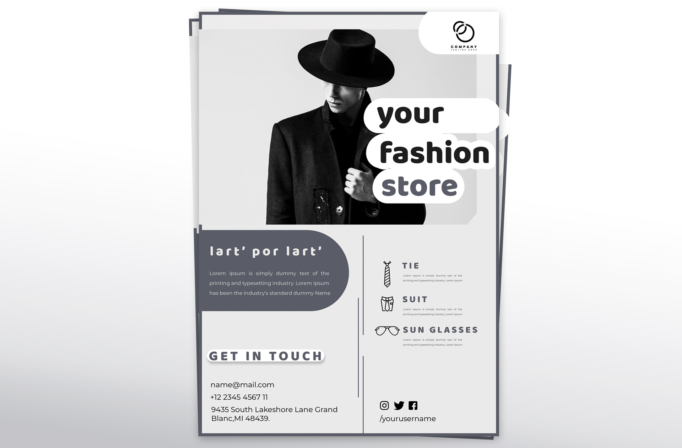
Free Brochure and Book Cover Photoshop Template 70 actually displays a monochrome promotional flyer for a fashion store. It is a natural fit for a menswear boutique, personal stylist, or accessories retailer promoting a curated collection. Its product-category icons and full contact panel also make it useful as a showroom handout or brand introduction for an independent label.
Design details
- A large black-and-white portrait of a model in a wide-brim hat and tailored coat anchors the upper half.
- The rounded white headline labels, reading “your fashion store,” overlap the photo on the right and use bold, friendly lowercase typography.
- A small logo sits in a curved white corner panel at the top, keeping the brand visible without crowding the fashion image.
- The lower section is split vertically: a rounded gray introduction block and contact details appear on the left, while product categories appear on the right.
- Simple line icons identify tie, suit, and sunglasses offerings, and social icons with a username complete the footer area.
Black, white, and cool gray give the flyer an editorial boutique mood. Rounded panels soften the strict grid, while spaced uppercase subheadings and outlined category icons add a contemporary catalog feel.
How to use it
- Download the ZIP file and open the PSD in Photoshop.
- Replace the model portrait with a high-contrast campaign image that leaves room on the right for the stacked headline.
- Add your logo, store name, short brand story, email, phone number, address, and social username.
- Rename the three product categories and replace their icons when promoting other items such as coats, footwear, or bags.
- Keep the monochrome palette for a premium look, or introduce one muted brand color in the gray panels before exporting for print or online use.
Download
Download free-brochure-and-book-cover-photoshop-template-24.zip“>Download Flyer-Design-Template-70.zip
Related templates
Best flyer templates roundup and business flyer hub.
FAQ
Can I edit this flyer in Photoshop?
Yes. The Photoshop file can be customized with a new portrait, logo, category names, icons, contact details, and social information.
What should I change first?
Change the main portrait and store headline first because they define the campaign. Then tailor the category list and contact panel.
Can I use it for print and social media?
Yes. Use the full page as a boutique flyer or showroom sheet, and crop the portrait with its stacked headline for social ads and posts.







