
What this template is for
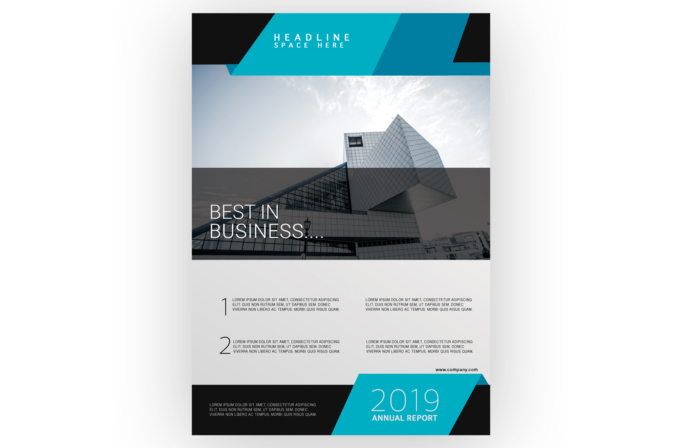
Free Brochure and Book Cover Photoshop Template 68 is shown as a contemporary annual report or corporate publication cover. Its architectural photography, numbered content summaries, and prominent year panel suit an annual report, real estate development overview, or architecture and engineering company profile. It can also work as the opening page for a business proposal that needs a modern, technical identity.
Design details
- A black header is crossed by layered cyan and teal trapezoids, creating a crisp space for a short, widely tracked headline.
- The central photo zone features a modern angular building beneath a bright sky, with a translucent charcoal band darkening the lower portion.
- Thin white “BEST IN BUSINESS” typography sits over the darkened photograph and contrasts with the heavier geometric shapes above and below.
- The white information area uses two numbered rows and four compact text blocks, giving the page the feel of an executive summary.
- A black footer and large cyan diagonal panel frame the year and “ANNUAL REPORT” label, creating a strong publication-cover finish.
The cool cyan, blue, black, and white palette feels precise and forward-looking. Angled forms repeat the building’s geometry, while the mix of thin display type and compact sans serif copy supports a professional editorial hierarchy.
How to use it
- Download the ZIP file and open the Photoshop source.
- Replace the architecture photo with a headquarters, development, infrastructure, or product image that complements the angular overlays.
- Update the top headline, main statement, year, website, and annual report label for your organization.
- Use the numbered rows for key achievements, strategic priorities, or report highlights. Keep the summaries short enough to retain the airy layout.
- Match the cyan and teal shapes to your brand palette, then export at print resolution for a cover or as a web-ready preview image.
Download
Download free-brochure-and-book-cover-photoshop-template-23.zip“>Download Flyer-Design-Template-68.zip
Related templates
Best flyer templates roundup and business flyer hub.
FAQ
Can I edit this flyer in Photoshop?
Yes. The PSD format allows you to change the image, report year, headings, body copy, website, and geometric accent colors.
What should I change first?
Replace the year and central building image first, then rewrite the numbered summaries around the specific results or services you want to feature.
Can I use it for print and social media?
Yes. It is particularly effective as a report cover or corporate handout, and the central image and year panel can be adapted into launch graphics for social media.







