
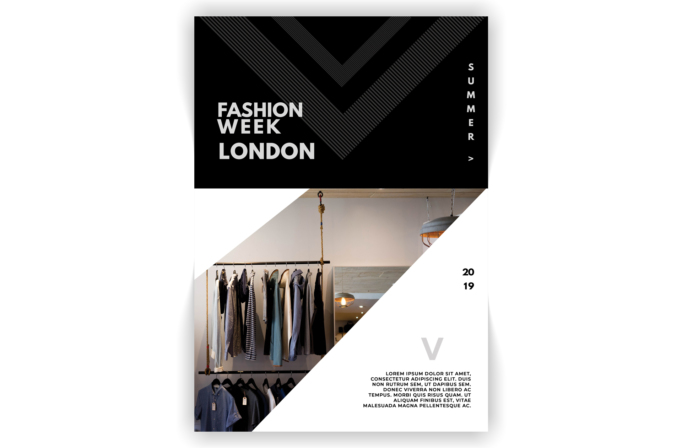
What this template is for
Free Brochure and Book Cover Photoshop Template 67 actually shows a minimalist Fashion Week London poster rather than a conventional brochure or book cover. Its stark black-and-white styling fits a runway event, an independent designer showcase, or a fashion retail launch. The same editorial look could also promote a gallery opening or other design-led event where atmosphere matters more than detailed copy.
Design details
- The upper section is a solid black field with oversized dark gray striped chevrons that add subtle movement without weakening the monochrome palette.
- A stacked white “FASHION WEEK LONDON” headline sits low on the left in a heavy geometric sans serif.
- The word “SUMMER” runs vertically near the right edge, followed by a small arrow, creating a fashion-editorial detail.
- The lower image shows clothing on a rail inside a boutique and is cut by two dramatic diagonal white shapes.
- A split “20 / 19” date, a pale gray letterform, and a compact right-aligned description occupy the open white area.
The composition relies on contrast and asymmetry. Deep black creates a premium runway mood, while the uncluttered white lower half gives the photograph and sparse event information room to breathe. The diagonal image crop makes the poster feel active even though its colors remain restrained.
How to use it
- Download the ZIP file and open the PSD in Photoshop.
- Replace the boutique photograph with a runway, collection, model, or venue image that still reads well inside the sharp diagonal crop.
- Change the event name, city, season, year, and short description. Keep the headline compact so the strong stacked treatment remains intact.
- Retain black and white for a severe editorial look, or recolor the striped chevrons with one restrained seasonal accent.
- Add practical details such as date, venue, ticket URL, or social handle in the available lower-right space, then export for print or digital promotion.
Download
Download free-brochure-and-book-cover-photoshop-template-22.zip“>Download Flyer-Design-Template-67.zip
Related templates
Best flyer templates roundup and business flyer hub.
FAQ
Can I edit this flyer in Photoshop?
Yes. You can replace the photo and update the city, season, year, headline, and descriptive text in Photoshop.
What should I change first?
Change the event name and date first, then choose a strong fashion photograph whose main subject remains visible within the diagonal mask.
Can I use it for print and social media?
Yes. Use the full portrait layout for posters and handouts, then adapt the black headline area and diagonal photo treatment into social event graphics.







