
What this template is for
Free Brochure and Book Cover Photoshop Template 66 presents a polished corporate services layout built around modern architecture and a restrained business palette. It is especially well suited to an architecture studio, commercial property company, or creative agency that needs a one-page capabilities sheet. The structured content blocks also make it useful as a company profile cover or a concise consulting-services handout.
Design details
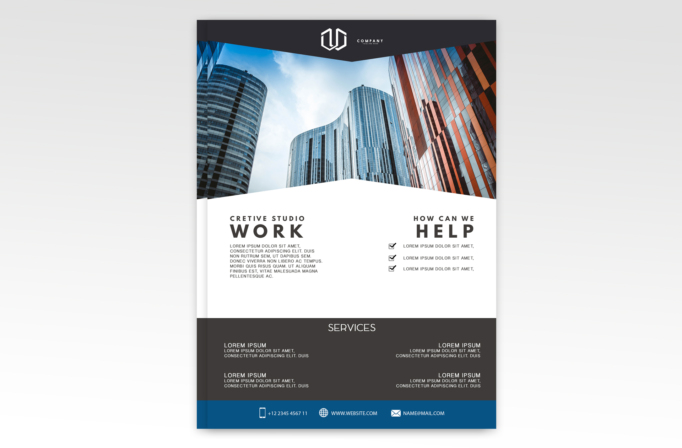
- A wide cityscape photograph dominates the upper half, with curved glass towers and a warm red facade creating a professional metropolitan mood.
- A charcoal header forms a shallow downward point over the image and centers a compact white logo lockup.
- The white middle section uses an angular roofline, pairing a bold “WORK” introduction on the left with a checked “HELP” list on the right.
- Large uppercase sans serif headings, wide letter spacing, and compact supporting copy give the typography a clean corporate feel.
- A dark gray services panel organizes four short offerings in two columns, while a blue footer holds phone, website, and email details with simple line icons.
The design feels established and orderly without becoming stiff. Blue accents echo the glass buildings, while charcoal, white, and muted gray keep the page easy to brand. The generous white space helps the photo and oversized headings carry the visual hierarchy.
How to use it
- Download the ZIP file and open the PSD source in Photoshop.
- Replace the skyline image with a high-resolution architectural, office, or team photograph that remains clear beneath the angled masks.
- Update the logo, “Work” introduction, checklist, and four service summaries with concise copy. Keep each item short to preserve the balanced spacing.
- Adjust the blue footer and charcoal panels to your brand colors, then enter accurate contact information.
- Export a print-ready PDF for a sales handout or a compressed image for email and online promotion.
Download
Download free-brochure-and-book-cover-photoshop-template-21.zip“>Download Flyer-Design-Template-66.zip
Related templates
Best flyer templates roundup and business flyer hub.
FAQ
Can I edit this flyer in Photoshop?
Yes. The Photoshop source lets you replace the photographs, logo, text, colors, and contact details while retaining the angular composition.
What should I change first?
Start with the large architecture image and logo because they establish the brand immediately. Then tailor the two introductory blocks and four service descriptions.
Can I use it for print and social media?
Yes. Its portrait format works naturally as a printed one-page brochure, and you can resize or crop it for LinkedIn, email campaigns, and other digital channels.







