
What this template is for
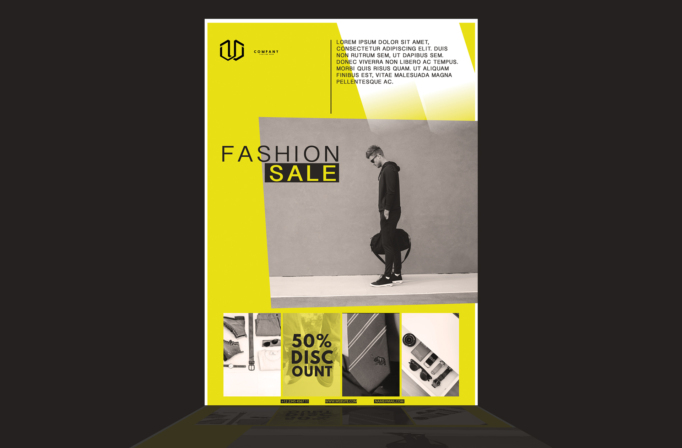
Free Brochure and Book Cover Photoshop Template 65 actually displays a fashion sale flyer with a bold editorial retail look. Electric yellow panels, black typography, grayscale lifestyle photography, and a modular image strip make the promotion feel youthful and urban. It is genuinely suited to a streetwear seasonal sale, a menswear shop discount campaign, or an accessories and lifestyle promotion built around a clear 50% offer.
Design details
- A vivid yellow background fills most of the page and is balanced by white geometric cutouts and black text.
- The compact company logo appears at upper left, while a short uppercase brand or campaign paragraph occupies the upper-right white panel.
- A large grayscale hero photograph shows a casually dressed man carrying a bag against a plain wall, creating a minimal street-style mood.
- The “Fashion Sale” headline overlaps the upper-left edge of the hero image. Widely spaced black letters are paired with the word “Sale” reversed in yellow on a black rectangle.
- A bottom strip contains four narrow visual panels featuring apparel, accessories, fabric details, and small objects. One panel is tinted yellow and carries the stacked 50% discount message.
- Phone, website, and email details run in tiny black labels along the bottom edge, keeping the contact information present without competing with the imagery.
How to use it
- Download the ZIP file and open the source in Photoshop.
- Replace the central hero with a high-resolution full-body or three-quarter fashion image against a simple background. A grayscale treatment will preserve the template’s editorial contrast.
- Fill the four lower panels with coordinated product crops such as shoes, shirts, bags, watches, eyewear, or fabric close-ups.
- Update the brand paragraph, sale headline, discount percentage, and campaign conditions. Make the offer specific and accurate.
- Replace every contact detail, then export a print flyer and appropriately cropped digital versions for social posts, email announcements, or in-store screens.
Download
Download free-brochure-and-book-cover-photoshop-template-20.zip“>Download Flyer-Design-Template-65.zip
Related templates
Find more retail-ready compositions in the best flyer templates roundup, or explore the business flyer hub for further sale and event designs.
FAQ
Which brands fit this template?
The strong yellow and monochrome treatment suits streetwear, contemporary menswear, footwear, accessories, and youth-focused lifestyle shops.
Can the yellow be changed?
Yes. A bright brand color can replace it, but it should remain vivid enough to contrast with black text and grayscale photos.
How many photos are needed?
Plan for one large lifestyle image and four smaller product or detail images. A coordinated set will make the modular lower strip feel intentional.







