
What this template is for
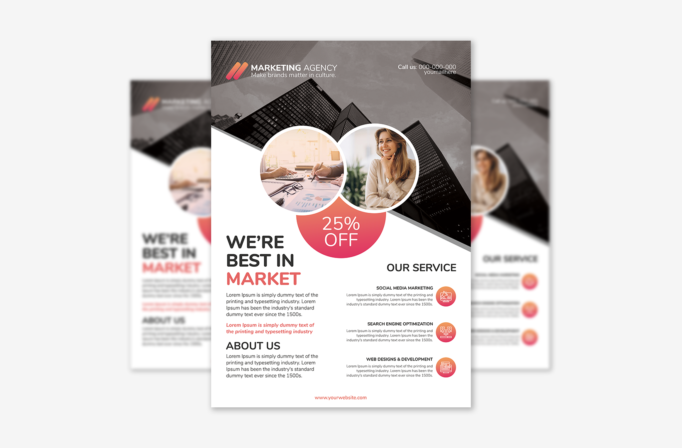
Free Brochure-Style Photoshop Flyer Template 55 is a polished marketing agency flyer with the information density of a compact one-page brochure. It is designed for a creative studio, digital consultancy, advertising team, or web agency that wants to introduce its services and promote a limited-time offer in one piece. The combination of corporate architecture, friendly workplace photography, and clearly divided service copy gives the page a professional but approachable character.
Design details
- A grayscale city-skyscraper photograph fills the upper background, creating scale and an urban business mood.
- Two overlapping circular photo zones sit across the diagonal transition: one shows hands reviewing charts, while the other features a smiling professional.
- A coral-to-pink gradient is used for the logo mark, the large 25% off circle, accent text, and round service icons.
- The lower white area uses a two-column brochure layout, with the main statement and About Us copy on the left and three service summaries on the right.
- Rounded geometric sans-serif headlines feel modern and friendly, while smaller body text remains practical and easy to scan.
How to use it
- Download the ZIP file and open the PSD source in Photoshop.
- Replace the agency name, logo, phone number, email, website, and short brand statement at the top.
- Swap the skyline and circular photographs with images that represent your team, clients, or work process. Choose photos with compatible crops so the overlapping circles remain balanced.
- Rewrite the main pitch, About Us paragraph, and three service descriptions. The layout is especially suitable for social media marketing, search optimization, and web design, but it can also present consulting or creative services.
- Update the discount only if your campaign includes a genuine offer, then export a print-ready file or a web version at the size required by your channel.
Download
Download free-brochurestyle-photoshop-flyer-template-29.zip“>Download Flyer-Design-Template-55.zip
Related templates
Explore the best flyer templates roundup for more promotional layouts, or browse the business flyer hub for editable designs suited to agencies and service brands.
FAQ
Can I edit this flyer in Photoshop?
Yes. The Photoshop source lets you replace the text, branding, photographs, offer, and colors to match your campaign.
What campaigns fit this layout best?
It works particularly well for an agency introduction, a digital marketing service menu, or a new-client discount campaign. The two-column lower section can also support a consultancy overview.
What images should I use?
Choose one architectural or city image for the background and two bright business or team images for the circular frames. Consistent lighting will help the three photographs feel like one visual system.







