
What this template is for
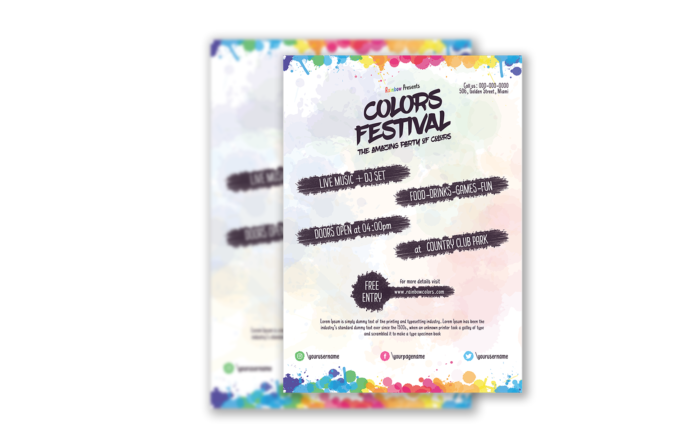
Free Brochure-Style Photoshop Flyer Template 54 actually presents a watercolor colors festival poster, not a conventional brochure. It is suited to arts events, outdoor music gatherings, color parties, and community festivals that need a creative but easy-to-scan announcement. Compared with the denser splash treatment of a typical color-run poster, this design uses a pale watercolor wash and dark brush labels to create a softer, handmade mood. It still provides clear zones for entertainment, activities, opening time, venue, admission, descriptive copy, and social profiles.
Design details
- A nearly white background carries translucent pastel washes across the page, with saturated blue, green, yellow, orange, pink, and purple paint splashes concentrated along the top and bottom edges.
- The large Colors Festival title uses loose dark-purple brush lettering, supported by a smaller subtitle and compact contact details in the upper-right corner.
- Four staggered black brush-stroke banners highlight live music and a DJ set, food and games, the opening time, and the country club park venue.
- A rough circular Free Entry badge anchors the lower middle, followed by a short description and Instagram, Facebook, and Twitter handles.
How to use it
- Download the ZIP file and open the PSD source in Photoshop.
- Replace the event name, phone, address, program highlights, opening time, venue, website, descriptive paragraph, and social usernames.
- Keep new banner text short and check contrast carefully, since the narrow handwritten type depends on the dark painted shapes behind it.
- Export a high-resolution print version and separate mobile crops that retain the title, date or time, venue, and admission information.
Download
Download free-brochurestyle-photoshop-flyer-template-28.zip“>Download Flyer-Design-Template-54.zip
Related templates
Explore more artistic announcements in the best flyer templates roundup, or visit the business flyer hub for editable festival and community-event designs.
FAQ
Can I edit this flyer in Photoshop?
Yes. You can change the event wording, painted labels, colors, contact details, and social handles in Photoshop. Review the layer organization before moving watercolor textures or brush shapes that overlap multiple areas.
What should I change first?
Replace the title and essential logistics first, especially the venue, time, admission, and contact details. Then adjust the entertainment and activity banners to match the actual event program.
Can I use it for print and social media?
Yes. The portrait artwork works naturally as a poster or flyer. For social media, crop the title and two key banners together, or create a second graphic focused on the Free Entry badge and venue.







