
What this template is for
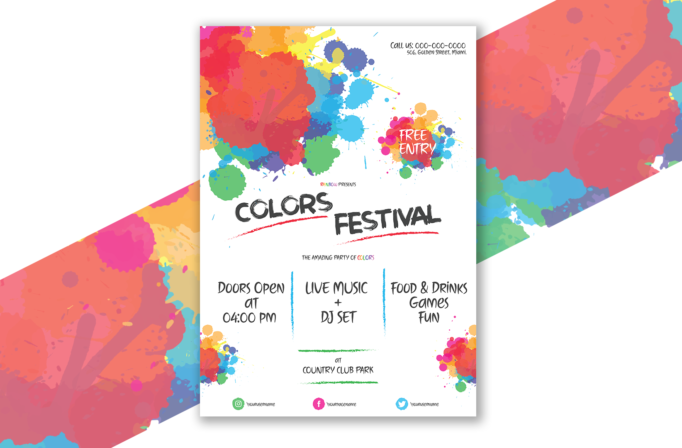
Free Brochure-Style Photoshop Flyer Template 53 actually shows a lively colors festival poster rather than a brochure. It is designed for outdoor community events, color runs, campus celebrations, and family-friendly music festivals. The large paint splashes, hand-painted lettering, and open white background give the artwork an energetic, informal mood. The layout also makes room for practical event details such as opening time, entertainment, activities, venue, admission, contact information, and social channels.
Design details
- Large overlapping splashes in coral, red, orange, yellow, green, blue, purple, and pink fill the upper-left area and reappear in the lower corners.
- The Colors Festival title uses oversized charcoal brush lettering with rough red underline strokes, while a multicolor Free Entry splash acts as a secondary badge.
- Three centered information columns separate the opening time, live music and DJ set, and food, drinks, games, and fun with vertical blue brush lines.
- A green hand-drawn frame emphasizes the venue, while colorful Instagram, Facebook, and Twitter icons create an orderly footer.
How to use it
- Download the ZIP file and open the included AI source in a compatible vector editor.
- Replace the festival name, admission message, phone number, address, time, entertainment, activities, venue, and social usernames.
- Keep the handwritten copy brief so the brush lettering stays legible and the central white space does not become crowded.
- Export a print-ready poster for local promotion and resized RGB versions for event pages, Stories, and community social channels.
Download
Download free-brochurestyle-photoshop-flyer-template-27.zip“>Download Flyer-Design-Template-53.zip
Related templates
Find more expressive event designs in the best flyer templates roundup, or browse the business flyer hub for customizable festival and promotion layouts.
FAQ
Can I edit this flyer in Photoshop?
The original draft identifies an AI source, so it is intended for Adobe Illustrator or another compatible vector editor. You can still place an exported version in Photoshop, but text and vector editing are best handled in the source format.
What should I change first?
Update the festival title and event logistics first. Confirm the time, venue, admission policy, and contact number, then tailor the three feature columns to the real program.
Can I use it for print and social media?
Yes. Its tall format suits posters and handouts, while the colorful title area is easy to crop for social media. Always retain the date, location, and admission details in digital versions.







