
What this template is for
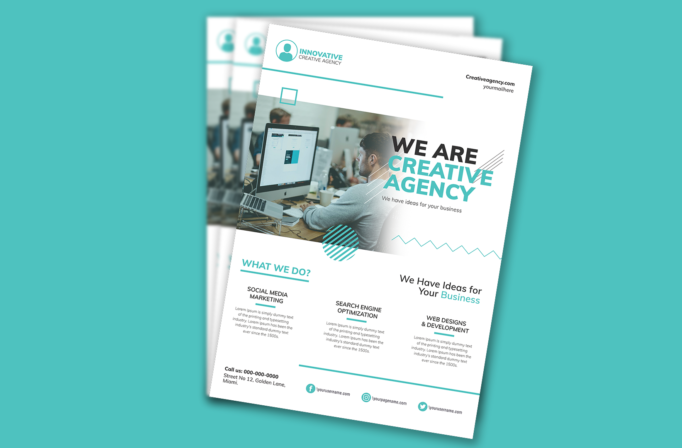
Free Brochure-Style Photoshop Flyer Template 52 is a clean creative agency flyer that combines a workplace photograph, bold brand statement, three service descriptions, and social contact information. Its brochure-like information hierarchy suits design studios, digital agencies, freelance collectives, and web development firms. The layout is especially useful as a capability sheet, networking-event handout, or downloadable introduction for prospective clients. Its mood is modern, approachable, and organized, with restrained decorative geometry rather than heavy sales graphics.
Design details
- A generous white header places a turquoise circular profile logo and agency name on the left, with website and email details aligned to the right.
- The main image shows a contemporary office and flows into a white gradient where a large black and turquoise We Are Creative Agency headline remains highly readable.
- Thin diagonal lines, an outlined square, a striped turquoise circle, and a zigzag rule add a light geometric identity around the hero area.
- The lower half introduces social media marketing, search engine optimization, and web design and development in three balanced columns, followed by address and social handles.
How to use it
- Download the ZIP file and open the source artwork in Photoshop.
- Replace the logo, agency name, hero statement, website, email, phone, address, and social usernames.
- Swap the office photograph for a team or project image with usable space on the right for the gradient and headline.
- Rewrite the three service summaries in compact language, then export a print-ready capability sheet or an optimized PDF for client outreach.
Download
Download free-brochurestyle-photoshop-flyer-template-26.zip“>Download Flyer-Design-Template-52.zip
Related templates
Explore similar one-page introductions in the best flyer templates roundup, or browse the business flyer hub for editable agency and professional-service materials.
FAQ
Can I edit this flyer in Photoshop?
Yes. The photograph, logo, colors, headline, service descriptions, and contact details can be changed in Photoshop. Keep the turquoise accents consistent across the geometric elements, headings, and social icons.
What should I change first?
Update the brand identity and hero photo first. Then replace each placeholder paragraph with a short benefit-focused description that fits the existing three-column structure without shrinking the body type excessively.
Can I use it for print and social media?
Yes. The complete portrait layout is effective as a printed agency sheet or downloadable PDF. For social platforms, crop the hero statement and turn each service column into a separate square post.







