
What this template is for
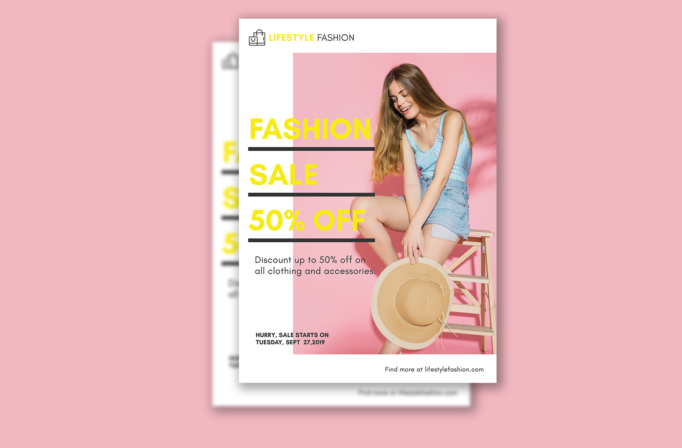
Free Brochure-Style Photoshop Flyer Template 50 actually shows a minimalist fashion sale poster centered on a lifestyle photograph and an oversized discount message. It is best suited to clothing boutiques, online apparel shops, seasonal accessory sales, and in-store promotional events. The bright palette and sparse copy make it feel youthful, sunny, and editorial rather than information-heavy. It can announce a summer clearance, a weekend pop-up, or a new collection launch with a limited-time offer.
Design details
- A white page frames a large pink photo zone positioned toward the right, featuring a seated model in light blue clothing holding a straw hat.
- The words Fashion, Sale, and 50% Off overlap the image from the left in huge lemon-yellow sans serif capitals.
- Thick charcoal horizontal rules divide the three headline lines and give the loose composition a strong editorial grid.
- A small shopping-bag logo sits in the upper-left corner, while supporting sale copy, the start date, and website occupy separate areas near the bottom.
How to use it
- Download the ZIP file and open the PSD in Photoshop.
- Replace the store name, discount, supporting sentence, promotion date, and website with current campaign information.
- Insert a high-resolution fashion image with a simple background and position the model so the large left-aligned typography does not cover the face or key products.
- Customize the yellow accent if needed, proof the date and discount, then export versions for storefront printing and social promotion.
Download
Download free-brochurestyle-photoshop-flyer-template-24.zip“>Download Flyer-Design-Template-50.zip
Related templates
See more eye-catching sale designs in the best flyer templates roundup, or browse the business flyer hub for retail and promotional layouts.
FAQ
Can I edit this flyer in Photoshop?
Yes. Photoshop lets you replace the model photo, brand name, sale amount, date, colors, and website. Use a properly licensed fashion photo with enough resolution for the intended print size.
What should I change first?
Change the photograph first because it controls the entire balance of the layout. Then match the accent color to your campaign and shorten the offer copy so the oversized headline remains the main focus.
Can I use it for print and social media?
Yes. The vertical format works as a boutique poster or handout. Create social variants by cropping around the model and headline, while keeping the discount and deadline visible in every version.







