
What this template is for
Free Brochure-Style Photoshop Flyer Template 49 is a travel agency flyer that combines a large destination-oriented hero image with package details and a direct booking prompt. It suits tour operators, independent travel consultants, holiday planners, and corporate travel services. The structured one-page layout can advertise several destinations at once while keeping the primary message emotional and aspirational. Use it for seasonal vacation packages, travel fair handouts, or a concise agency service sheet.
Design details
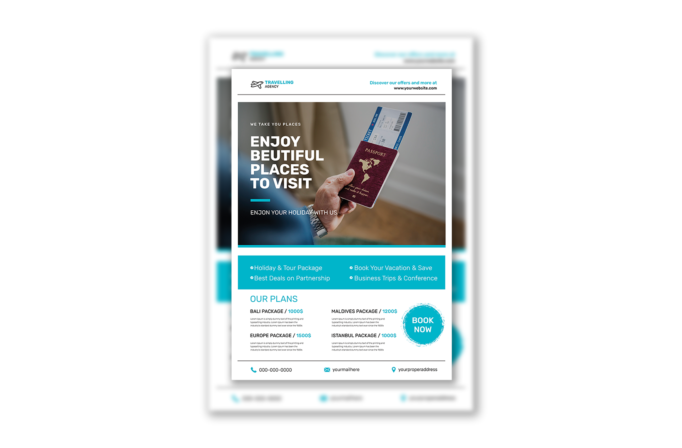
- A clean white header holds an airplane logo on the left and a turquoise website prompt on the right, separated from the body by a thin gray rule.
- The main photo shows a traveler holding a passport and boarding pass, with a darkened left side supporting a large white headline and turquoise accent line.
- A full-width turquoise strip organizes four benefits in two columns, using white check symbols and light, open typography.
- The lower section lists Bali, Maldives, Europe, and Istanbul packages with turquoise prices, short descriptions, a rough-edged Book Now badge, and a contact footer.
How to use it
- Download the ZIP file and open the Photoshop source.
- Replace the agency logo, website, hero headline, package benefits, destination names, prices, descriptions, and contact details.
- Swap in a sharp travel photograph with a clear subject on the right and enough darker space on the left for legible white type.
- Check all fares and booking terms before exporting the flyer for print, email campaigns, travel fairs, or online promotion.
Download
Download free-brochurestyle-photoshop-flyer-template-23.zip“>Download Flyer-Design-Template-49.zip
Related templates
Compare more promotional layouts in the best flyer templates roundup, then browse the business flyer hub for adaptable service and campaign designs.
FAQ
Can I edit this flyer in Photoshop?
Yes. The travel photo, destination packages, prices, logo, feature list, and contact line can all be personalized in Photoshop. Keep text layers editable until the final pricing review is complete.
What should I change first?
Begin with the agency branding and hero image, then update every destination and fare. Short descriptions work best because the package area relies on generous white space and a clear two-column rhythm.
Can I use it for print and social media?
Yes. Export the complete portrait sheet for print or PDF distribution. For social channels, crop the hero as one post and turn individual package blocks into a small campaign series.







