
What this template is for
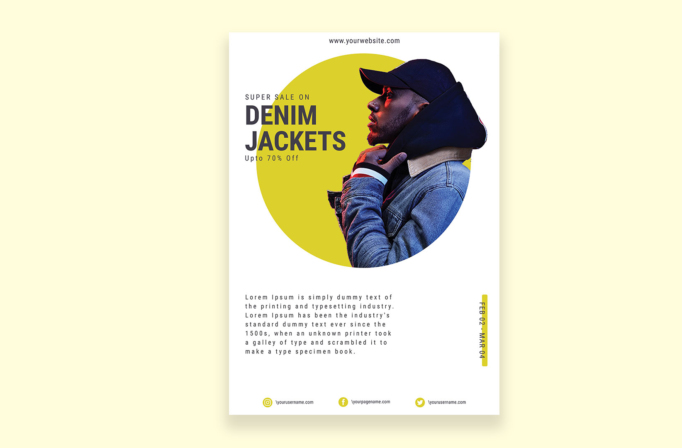
Free Brochure-Style Photoshop Flyer Template 36 is a minimalist denim sale flyer built around a bold fashion portrait and a large circular color field. The model in layered denim and a dark cap overlaps a vivid yellow circle, while the sale headline remains readable on the left. It is a strong fit for a denim collection launch, streetwear clearance event, or seasonal outerwear promotion.
Design details
- A clean white background gives the fashion cutout, typography, and yellow accent generous breathing room.
- The oversized mustard-yellow circle acts as both a graphic anchor and a backdrop for the model.
- A profile portrait extends beyond the circle, creating depth and an editorial magazine-cover effect.
- The left-aligned headline combines widely spaced small capitals with heavy condensed words for “Denim Jackets.”
- A compact “Up to 70% Off” line sits directly below the headline, keeping the promotion prominent without adding a badge.
- A vertical yellow date tab balances the lower-right side, while a short descriptive paragraph occupies the lower-left area.
- Instagram, Facebook, and Twitter details form a neat three-part footer.
The navy denim, charcoal type, white space, and acid-yellow circle produce a modern urban mood. The asymmetrical overlap feels youthful and editorial, making this more refined than a crowded retail sale poster.
How to use it
- Download the ZIP file and open the PSD in Photoshop.
- Replace the model with a clean cutout of your featured jacket, apparel look, or campaign subject.
- Update the product category, discount, sale dates, description, website, and social handles.
- Change the yellow circle and tab to a campaign color, then export a high-resolution print version and resized social crops.
Select a portrait that faces toward the headline or leaves negative space on the left. Keep the description concise and preserve the generous margins that give the template its premium fashion feel.
Download
Download free-brochurestyle-photoshop-flyer-template-11.zip“>Download Flyer-Design-Template-36.zip
Related templates
Best flyer templates roundup and business flyer hub.
FAQ
Can I edit this flyer in Photoshop?
Yes. Replace the portrait, headline, discount, dates, paragraph, website, social accounts, and accent color in Photoshop.
What photography works best?
Use a sharply cut-out waist-up or full-body fashion image with directional lighting and enough edge contrast against the circle.
Which campaigns suit it?
It works for denim launches, streetwear sales, and limited-time fashion pop-ups.







