
What this template is for
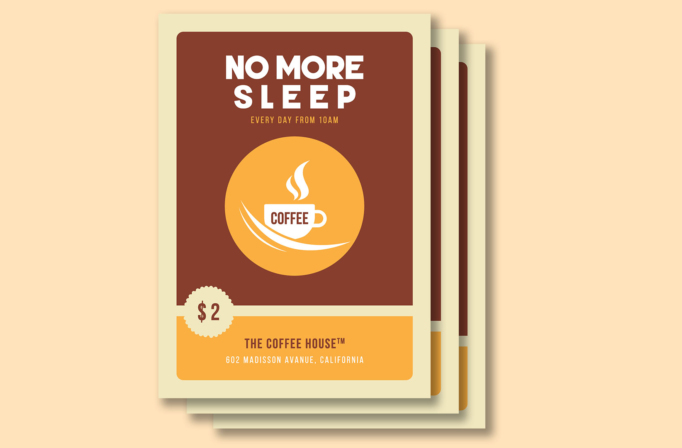
Free Brochure-Style Photoshop Flyer Template 31 is a retro coffee promotion built around a simple, highly visible offer. The design advertises “No More Sleep,” a daily opening time, a two-dollar price, and a coffee-house address. Its limited brown, cream, and golden-orange palette gives it the warmth of a neighborhood cafe sign or vintage diner poster. Use it for a morning coffee special, cafe opening announcement, or low-price beverage campaign.
Design details
- A pale cream page frames a large rounded dark-brown panel, creating a soft poster-within-a-poster composition.
- The massive white uppercase headline is centered at the top and uses wide spacing to make the sleepy theme playful and immediate.
- A narrow golden-orange subheading announces the schedule without competing with the main message.
- The center features a large orange circle containing a white coffee cup, rising steam, and sweeping saucer-like curves.
- A scalloped cream price badge overlaps the boundary between the main panel and the lower information area.
- The wide orange footer carries the cafe name and address in brown and white condensed lettering.
The flat vector illustration and restrained colors make this template feel friendly, affordable, and slightly nostalgic. There is no photo zone, so the message stays legible at a distance and reproduces cleanly on menus, counter signs, and simple promotional prints.
How to use it
- Download the ZIP file and open the PSD in Photoshop.
- Change the headline, opening time, price, cafe name, and street address.
- Recolor the brown and orange shapes if your shop uses a different brand palette.
- Keep the central cup graphic or replace it with another simple drink icon, then export for print or online promotion.
Short wording works best in the oversized headline. If you promote tea, cocoa, or a seasonal drink, preserve the strong silhouette and avoid adding detailed photography that would weaken the clean retro style.
Download
Download free-brochurestyle-photoshop-flyer-template-6.zip“>Download Flyer-Design-Template-31.zip
Related templates
Best flyer templates roundup and business flyer hub.
FAQ
Can I edit this flyer in Photoshop?
Yes. You can update the promotional wording, price, schedule, colors, business name, and address in Photoshop.
What businesses suit this template?
It works particularly well for independent coffee shops, breakfast counters, and student cafes running a simple daily drink offer.
Can I use it without a product photo?
Yes. The bold cup illustration is the intended focal point and keeps the design clear even when printed at smaller sizes.







