
What this template is for
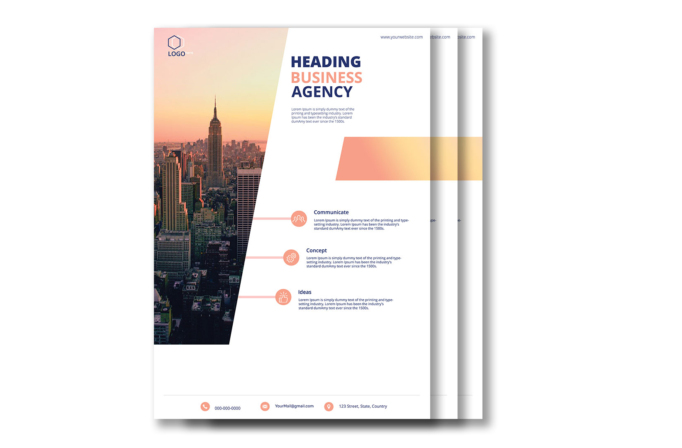
Free Brochure-Style Photoshop Flyer Template 30 is a polished corporate flyer for agencies, consultants, and service businesses that need to introduce their capabilities in a clear one-page format. Its left side is dominated by a warm city photograph, while the spacious white panel on the right organizes a business headline, short introduction, and three service points. The professional structure is especially suitable for an agency overview, consulting handout, or company capabilities sheet.
Design details
- A tall New York skyline photograph fills the left half and is cut by a strong diagonal white edge.
- Navy blue and soft coral typography creates a confident corporate palette, with a peach-to-yellow gradient accent block.
- The oversized uppercase headline uses three stacked lines, giving the words “Business Agency” immediate visual priority.
- Three horizontal feature rows combine coral connector lines, circular outline icons, bold labels, and compact descriptive copy.
- A restrained header holds the logo and website, while a slim footer presents phone, email, and address details with matching icons.
The contrast between the cinematic city image and the clean editorial content area makes the flyer feel established and contemporary. Replace the skyline with an office, development, architecture, or local market photograph to shift the emphasis without changing the layout.
How to use it
- Download the ZIP file and open the PSD source in Photoshop.
- Replace the logo, website, company headline, introductory paragraph, and contact details.
- Swap the main photograph while preserving the diagonal crop, then update the three icons and service descriptions.
- Adjust the navy, coral, and gradient colors to match your brand before exporting a print PDF or web-ready image.
Keep the headline short enough to retain its bold three-line rhythm. The three feature rows work best when each title is one or two words and each description remains concise.
Download
Download free-brochurestyle-photoshop-flyer-template-5.zip“>Download Flyer-Design-Template-30.zip
Related templates
Best flyer templates roundup and business flyer hub.
FAQ
Can I edit this flyer in Photoshop?
Yes. The PSD format lets you replace the photo, text, colors, icons, logo, and contact information in Photoshop.
Which projects fit this design?
It is a natural fit for creative agencies, property or architecture firms, and professional consultants presenting three core services.
Can I use it for print and social media?
Yes. Export the full portrait layout for print, or create cropped versions that focus on the headline and feature rows for social campaigns.







