
What this template is for
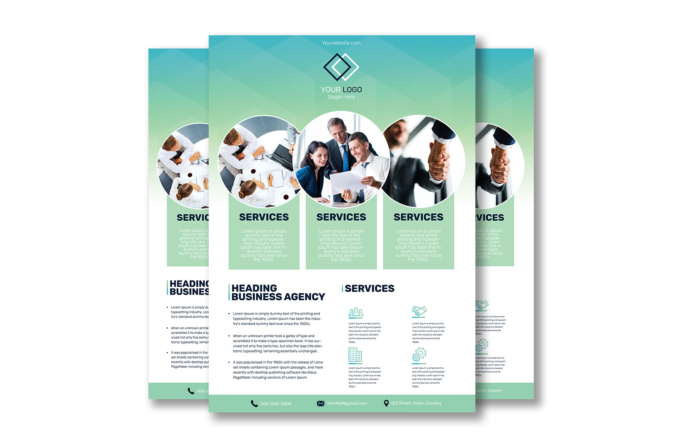
Free Brochure-Style Photoshop Flyer Template 29 is a friendly corporate services flyer organized around three large circular business photographs. It provides a logo introduction, three featured service columns, an agency overview, four supporting capabilities, and a complete contact strip. The design fits HR consultancies, team development companies, financial advisers, and general business service agencies. It can be used as a company profile sheet, a conference handout, or an overview sent to prospective clients.
Design details
- The upper background uses a soft aqua-to-mint gradient with translucent geometric shapes that suggest folded panels or abstract office architecture.
- A centered overlapping-square logo and website sit above three large white-bordered circular photo zones.
- The photos show an overhead meeting, a collaborative team reviewing documents, and a close-up handshake, creating a clear story of planning, teamwork, and partnership.
- Each circle connects to a pale green rectangular service card with a bold navy heading and centered white description.
- The lower white section divides into a broad “Heading Business Agency” bullet list and a smaller “Services” grid with four turquoise line icons.
- A mint contact bar spans the bottom and uses dark navy icons for phone, email, and location details.
How to use it
- Download the ZIP file and open the Photoshop source.
- Replace the logo, slogan, website, section headings, service copy, agency description, and footer contact details.
- Choose three bright photos with centered subjects so the circular crops remain clear and visually consistent.
- Give each top card a distinct service name instead of repeating the same label, then match the four lower icons to supporting benefits.
- Adjust the mint, aqua, and navy colors to your brand and export a high-resolution print file after checking the smaller descriptions.
Download
Download free-brochurestyle-photoshop-flyer-template-4.zip“>Download Flyer-Design-Template-29.zip
Related templates
See additional multi-section layouts in the best flyer templates roundup or browse the business flyer hub for more editable designs.
FAQ
Can I edit this flyer in Photoshop?
Yes. The PSD allows you to change the logo, photographs, service labels, body copy, icons, colors, and contact information.
What photos fit the circular layout?
Use coordinated images of meetings, customer interactions, team activities, or completed work. Keep key faces and gestures near the center of each image.
How should I divide my services?
Feature your three primary offers in the large cards, then use the four smaller icon blocks for methods, benefits, or supporting capabilities.







