
What this template is for
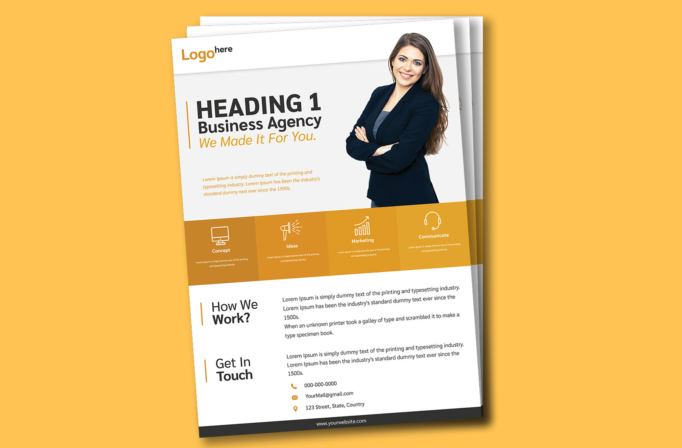
Free Brochure-Style Photoshop Flyer Template 28 is a spacious agency profile with a strong personal portrait, a four-part services band, a process explanation, and a contact section. It is especially appropriate for independent consultants, marketing agencies, personal branding studios, and client service firms that want to put a recognizable expert at the center of the message. Use it as a company introduction, a downloadable service overview, or a handout for networking and sales meetings.
Design details
- The palette combines white and very light gray with warm mustard, amber, and golden-orange accents for an approachable professional mood.
- A cutout portrait of a smiling businesswoman occupies the right side of the hero area, while the large left-aligned headline uses dark gray type and an orange vertical rule.
- The logo sits in a simple white header, and a short italic orange introduction adds personality beneath the main agency message.
- A full-width golden band contains four equal service cards labeled Concept, Ideas, Marketing, and Communicate, each with a clean white line icon.
- The lower white section uses two editorial rows: “How We Work?” beside a process description, then “Get In Touch” beside contact copy and icon-led details.
- A slim charcoal website footer closes the page with a crisp, stable visual base.
How to use it
- Download the ZIP file and open the PSD in Photoshop.
- Replace the logo, hero heading, agency name, tagline, and introductory statement with concise brand language.
- Use a high-resolution cutout portrait with a clean edge and enough vertical height to balance the large text block.
- Rename the four service cards and update their descriptions, keeping each card similar in length for an even row.
- Add your real process, phone, email, address, and website, then export for print or online distribution.
Download
Download free-brochurestyle-photoshop-flyer-template-3.zip“>Download Flyer-Design-Template-28.zip
Related templates
Discover more polished one-page designs in the best flyer templates roundup and explore the business flyer hub for related editable layouts.
FAQ
Can I edit this flyer in Photoshop?
Yes. Photoshop can be used to replace the portrait, text, logo, colors, icons, and all contact information.
What portrait works best?
Choose a waist-up or three-quarter business portrait on a transparent or easily removable background, with the subject facing slightly toward the headline.
Can this work without a personal portrait?
Yes. A product cutout, team image, or branded object can fill the same zone, but a single clean subject will preserve the layout’s clarity.







