
What this template is for
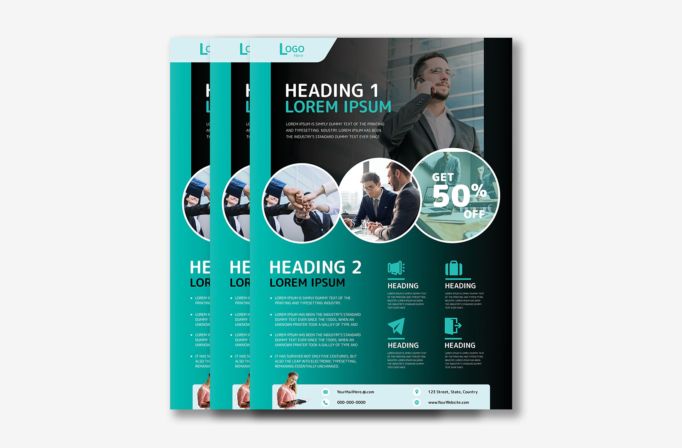
Free Brochure-Style Photoshop Flyer Template 26 is a content-rich business promotion that combines a hero image, a discount callout, service features, and complete contact details on one page. Its turquoise-to-black color treatment gives the design a modern commercial feel that fits consulting firms, business coaching programs, corporate training offers, and limited-time agency packages. The format works as a brochure-style leave-behind, a service menu, or a promotional flyer for a client acquisition campaign.
Design details
- A large photo of a suited professional on the phone fills the upper background, with a dark gradient added behind the white and turquoise headline.
- A pale rounded logo tab sits in the upper-left corner, while a vertical turquoise stripe creates a strong edge down the page.
- Three overlapping circular photo frames bridge the hero and content areas: a team fist bump, a business meeting, and a tinted office scene with a bold “Get 50% Off” message.
- The lower half fades from bright turquoise on the left to near black on the right, supporting a large bullet list and four compact feature blocks.
- Simple turquoise icons for promotion, travel, messaging, and access reinforce the service summaries without adding visual clutter.
- A pale rounded contact panel at the bottom includes a cutout person, email, phone, address, and website details.
How to use it
- Download the ZIP file and open the PSD in Photoshop.
- Replace the logo, two main headings, short introduction, bullet points, and four feature descriptions.
- Swap the four business photos with a coordinated set that reflects your team, customers, process, and promotional offer.
- Change the percentage callout to your real discount, package benefit, or measurable result, and remove it if no offer applies.
- Update every contact field and export only after confirming that white text remains readable across the gradient.
Download
Download free-brochurestyle-photoshop-flyer-template.zip“>Download Flyer-Design-Template-26.zip
Related templates
Explore the best flyer templates roundup for more full-page designs, or visit the business flyer hub for editable campaign layouts.
FAQ
Can I edit this flyer in Photoshop?
Yes. The PSD can be customized with your own text, logo, photos, colors, icons, offer, and contact information.
What images work in the circular frames?
Use bright, people-focused photos with subjects near the center so important faces and gestures are not clipped by the circular masks.
Do I have to advertise a discount?
No. Replace the 50% offer with a free consultation, a course date, a key statistic, or another concise callout that supports your campaign.







