
What this template is for
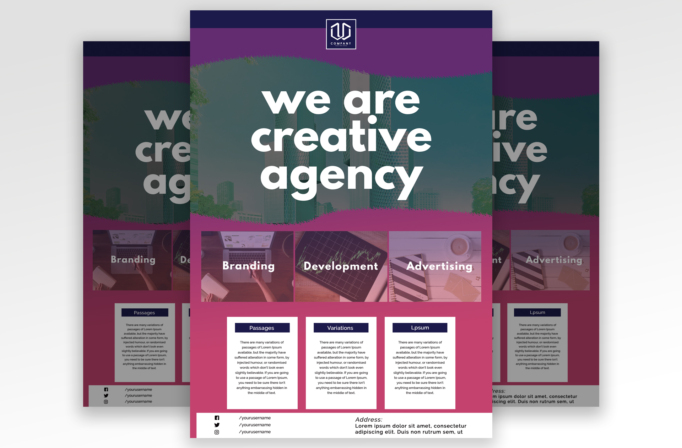
Free Brochure and Book Cover Photoshop Template 112 actually displays a colorful creative agency flyer rather than a brochure or book cover. It combines a city hero image, an oversized white agency statement, three visual service tiles, and three compact information cards. The purple, magenta, and deep navy palette feels confident and contemporary, making the template useful for a digital studio, advertising team, web agency, or creative consultancy.
Design details
- A dark navy header holds a centered square logo, followed by a broad purple painted band that introduces a tactile edge.
- The upper photo zone shows an urban skyline under a dark teal tint. Large rounded sans serif lettering is centered over the image across three lines for immediate brand impact.
- A rough magenta divider transitions into three side-by-side photo tiles labeled Branding, Development, and Advertising.
- Three white information cards sit below the service imagery. Each has a navy label bar and room for a short explanatory paragraph, creating a clear modular structure.
- The bottom white footer separates social handles on the left from an address block on the right, while the surrounding magenta keeps the page visually unified.
How to use it
- Download the ZIP and open the PSD source file in Photoshop.
- Replace the logo, central agency statement, service names, descriptions, social handles, and address.
- Swap the skyline and the three service photos with high-resolution images that share a similar lighting style. Apply consistent color overlays so the set feels cohesive.
- Limit each information card to a short, focused paragraph. Longer copy will weaken the generous spacing and make the three-column section harder to scan.
- Export a print version for sales meetings or networking events and a web-ready version for email outreach and portfolio downloads.
Download
Download free-brochure-and-book-cover-photoshop-template-13.zip“>Download Flyer-Design-Template-112.zip
Related templates
Explore the best flyer templates roundup for more visual styles and the business flyer hub for additional service-focused designs.
FAQ
Can I edit this flyer in Photoshop?
Yes. The Photoshop source supports changes to the images, overlays, colors, logo, service text, social details, and address.
What should I change first?
Start with the logo, agency statement, and four photos, then update the three services, description cards, social handles, and address.
Can I use it for print and social media?
Yes. A branding studio, development company, or advertising agency can print it for outreach and resize it for web campaigns.







