
What this template is for
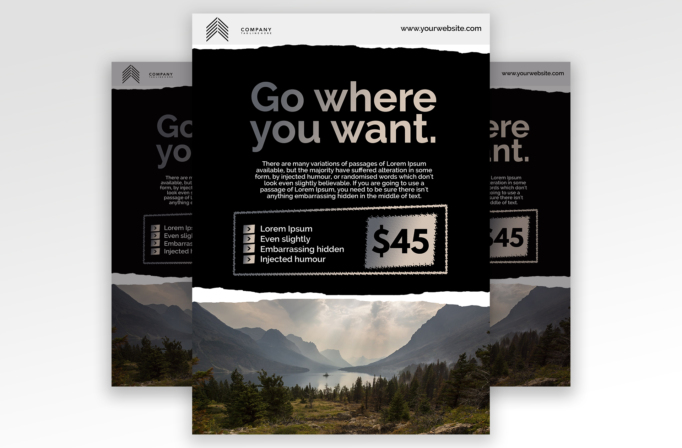
Free Brochure and Book Cover Photoshop Template 108 actually depicts a rugged travel promotion flyer. A dramatic mountain valley photograph fills the lower section, while a broad black panel carries the headline “Go where you want,” a short description, feature bullets, and a prominent $45 price. The high contrast, torn-paper edges, and expansive landscape give it an adventurous but professionally organized mood suited to a guided tour, outdoor retreat, or discounted travel package.
Design details
- A clean white header contains a geometric company mark on the left and a website address on the right.
- Rough torn-paper boundaries separate the white header, black information panel, and full-width scenic image, adding a handmade travel-journal texture.
- The large centered headline uses a modern sans serif with a gray-to-warm-white tonal shift. Its short lines create an inviting focal point.
- A centered paragraph explains the offer, followed by an outlined feature box containing four bullet points and a large price block.
- The landscape photo zone spans the entire bottom portion and works best with a wide scene that has a clear horizon, central route, or distant focal point.
How to use it
- Download the ZIP file and open the PSD in Photoshop.
- Replace the logo, website, headline, short sales copy, feature list, and price with details for your own package.
- Insert a high-resolution landscape photo. Position the horizon below the torn edge and keep important scenery away from the crop boundaries.
- Adjust the price panel if your offer includes a “from” rate, deposit, or limited-time discount, and keep the surrounding bullet copy brief.
- Export at print resolution for travel desks and noticeboards, plus a compressed digital version for newsletters and social channels.
Download
Download free-brochure-and-book-cover-photoshop-template-9.zip“>Download Flyer-Design-Template-108.zip
Related templates
See more bold promotional layouts in the best flyer templates roundup and the business flyer hub.
FAQ
Can I edit this flyer in Photoshop?
Yes. The design is intended for Photoshop edits, including the photograph, offer text, price, branding, and website.
What should I change first?
Start with the landscape image and trip headline, then revise the features, price, logo, website, and supporting copy.
Can I use it for print and social media?
Yes. It works as a printed promotion for hiking trips, retreats, or travel packages and can be resized for newsletters and social posts.







