
What this template is for
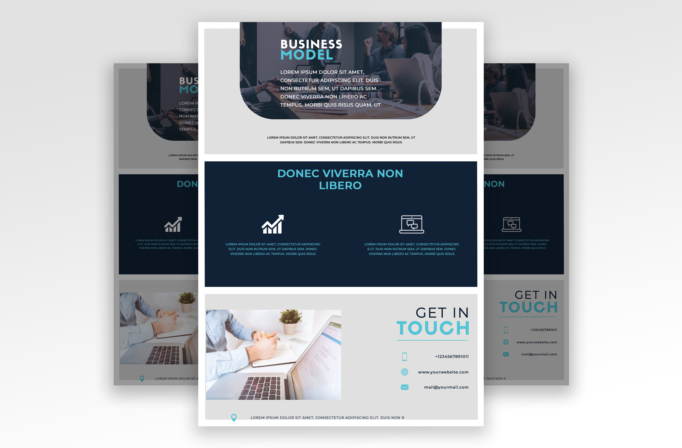
Free Brochure and Book Cover Photoshop Template 100 actually depicts a clean corporate business model flyer with a cool blue visual system. The design works well as a startup overview, a digital transformation service sheet, or a business workshop handout. It leads with a team meeting photograph, explains two key capabilities in a dark feature band, and closes with a contact area beside a second workplace image.
Design details
- A restrained palette of dark navy, white, light gray, and bright cyan accents that feels contemporary and technology oriented.
- A wide hero photograph across the upper portion, darkened for readable white copy and shaped with a large rounded lower edge.
- A compact “Business Model” title at the upper left, using heavy uppercase lettering with cyan applied to the second line.
- A full-width navy panel in the center with a cyan section heading and two spacious feature columns.
- Simple white line icons for growth and digital communication, followed by small cyan descriptions.
- A light gray bottom section with a large office photo on the left and phone, website, and email details on the right.
The layout feels calm, capable, and forward-looking. Broad horizontal bands make the information easy to follow, while the cyan accents add energy without weakening the professional tone. Rounded photography and generous empty space soften the otherwise formal grid.
How to use it
- Download the ZIP file and open the template in Photoshop.
- Replace both image zones with cohesive business photography that has similar lighting and color temperature.
- Rewrite the hero copy around one clear proposition, then use the center columns for two core benefits, services, or program outcomes.
- Swap the feature icons when needed and replace all contact information in the lower panel.
- Check contrast over the hero image, proof small copy at final size, and export for print or email distribution.
Download
Download free-brochure-and-book-cover-photoshop-template.zip“>Download Flyer-Design-Template-100.zip
Related templates
See more one-page layouts in the best flyer templates roundup, then explore the business flyer hub for additional professional designs.
FAQ
What content belongs in the two feature columns?
Use them for your two strongest services, product advantages, workshop topics, or measurable business outcomes.
What kind of photos should I choose?
Collaborative office scenes, presentations, and hands-on planning images match the corporate theme and wide crops.
Can the cyan accent be changed?
Yes. Replace it with a bright brand color that remains distinct against both navy and light gray backgrounds.







