
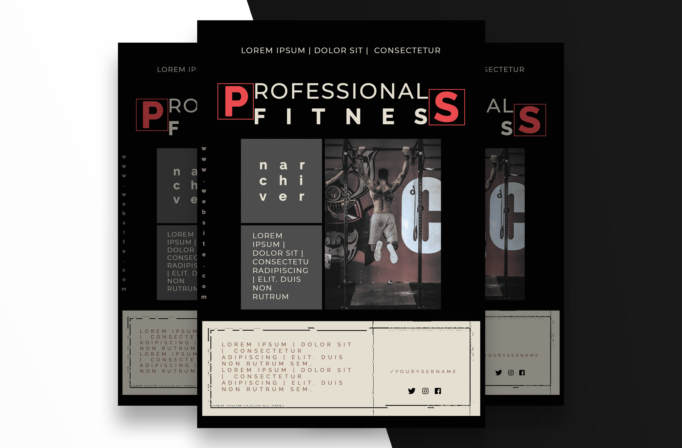
What this template is for
Free Brochure and Book Cover Photoshop Template 85 is shown as an intense professional fitness promotion rather than a general brochure. Its gritty gym image, modular grid, and oversized spaced lettering suit a personal trainer, strength studio, CrossFit-style event, or membership campaign. The restrained colors and industrial composition create a disciplined, premium mood aimed at serious training rather than casual wellness.
Design details
- A nearly black background establishes the dramatic base, with charcoal modules, warm off-white text, and selective red accents.
- The headline stretches across the top, turning the first and final letters into red boxed graphic elements.
- Wide letter spacing gives “Professional Fitness” a modern, athletic identity with a strong horizontal rhythm.
- A central monochrome action photo shows an athlete performing a pull-up inside an urban gym.
- Stacked gray panels at left provide areas for a trainer name and short program information.
- A large cream footer card contains extended copy, a social username, and compact social icons within a technical border treatment.
How to use it
- Download the archive and open the PSD in Photoshop.
- Swap in a high-contrast action photograph with the athlete centered and enough surrounding space for the crop.
- Replace the trainer name, program description, website, social handle, and headline while respecting the narrow text boxes.
- Use the red accent for a key letter, date, price, or call to action, keeping the rest of the palette subdued.
- Export a high-resolution print file for gym display and a resized digital edition for membership promotion.
Download
Download free-brochure-and-book-cover-photoshop-template-39.zip“>Download Flyer-Design-Template-85.zip
Related templates
Find additional bold compositions in the best flyer templates roundup and more editable campaigns in the business flyer hub.
FAQ
What kind of photo should replace the sample?
Use a sharp training image with a clear full-body action, controlled lighting, and a dark background that blends naturally into the layout.
Is the design suitable for a class schedule?
Yes. The gray modules can hold short class names or session times, while the cream footer can carry booking details and conditions.
Can I use brighter colors?
You can, but one concentrated accent color preserves the tough, focused character better than a multicolor palette.







