
What this template is for
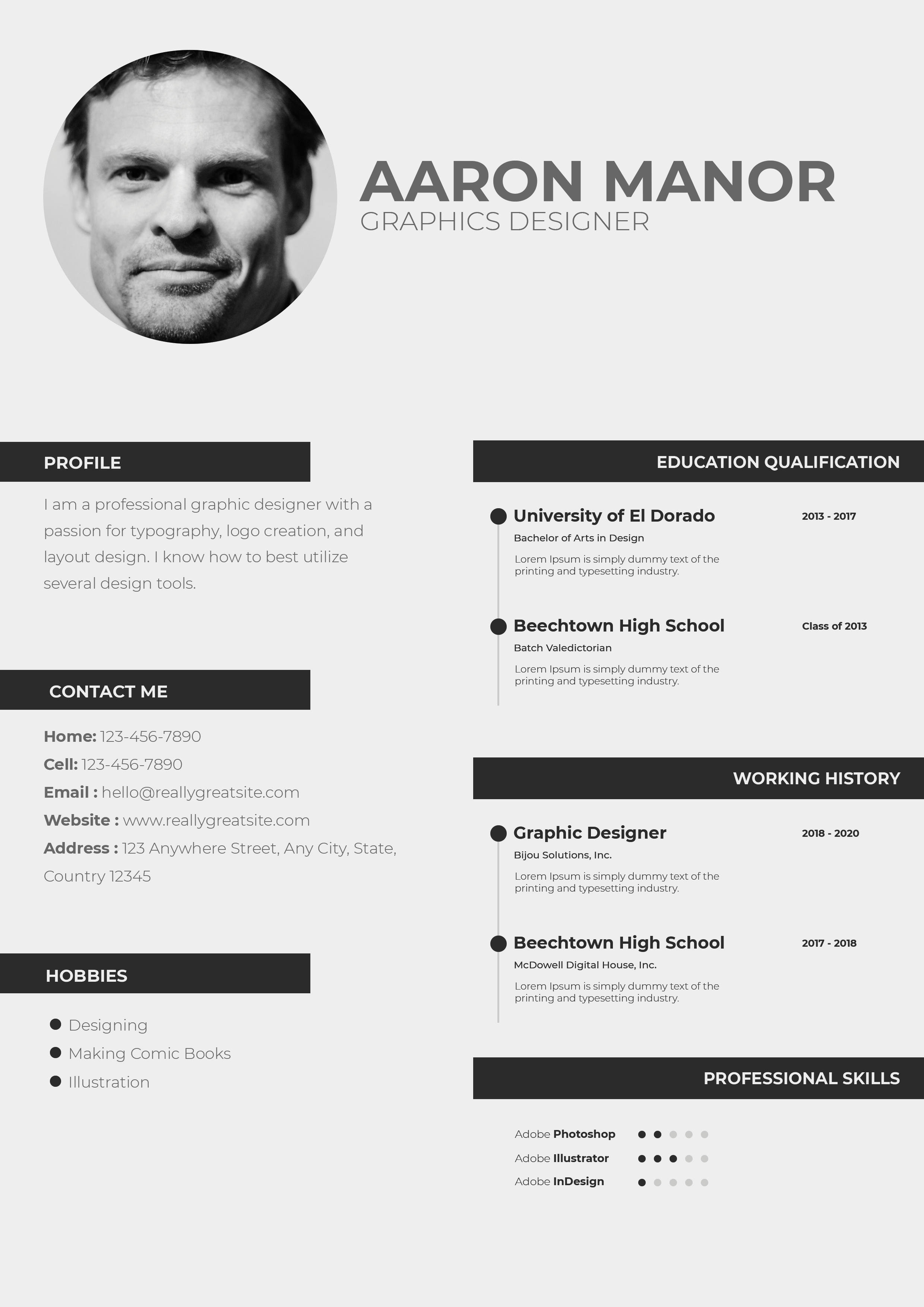
Free Photoshop Resume Template 37 is a clean, high-contrast resume built for visual communication roles. The black, white, and charcoal palette, bold sans serif headings, and modular two-column structure suit a graphic designer, creative director, or digital art specialist. It has a disciplined studio aesthetic that can complement a minimalist portfolio without looking overly decorative.
Design details
- A black-and-white portrait occupying the upper-left block, paired with a solid black name banner on the right
- A dark charcoal sidebar containing profile, contact information, and personal interests in white type
- A wide white content column for experience, academic details, skills, and references
- Condensed, uppercase sans serif headings that give the page a sharp editorial hierarchy
- Thin rules, compact date columns, monochrome icons, and horizontal proficiency bars for orderly scanning
The template divides the page into crisp rectangular zones. The portrait aligns exactly with the black title panel, producing a strong top banner, while the charcoal rail anchors the lower half. Most supporting copy is deliberately small and compact, which allows several sections to fit on one page. The restrained grayscale treatment makes the resume feel confident, modern, and suitable for a portfolio-led application.
How to use it
- Download the ZIP file and open the PSD source in Photoshop.
- Replace the top portrait with a high-contrast headshot that still reads clearly when converted to black and white.
- Update the name, professional title, profile, contact details, work history, education, skills, interests, and references.
- Use brief descriptions and accurate dates so the narrow rows remain aligned and uncluttered.
- Set realistic skill-bar lengths, proofread the small body copy at 100 percent zoom, and export a sharp PDF.
Download
Download free-photoshop-resume-template-47.zip“>Download resume37.zip
Related templates
Use the resume hub to refine your experience statements, and review the branding guide when matching this monochrome resume to a website or portfolio.
FAQ
Can I edit this resume in Photoshop?
Yes. The portrait, text, icons, rules, dark panels, and skill indicators can all be customized in the PSD.
What should I change first?
Start with the photo and black title banner, then edit the experience and education rows. These elements define the strongest alignment lines in the layout.
Can I use it for job applications today?
Yes. It is particularly effective for direct outreach and creative roles where presentation matters. Test the PDF for readable text before uploading it to an automated application system.








