
What this template is for
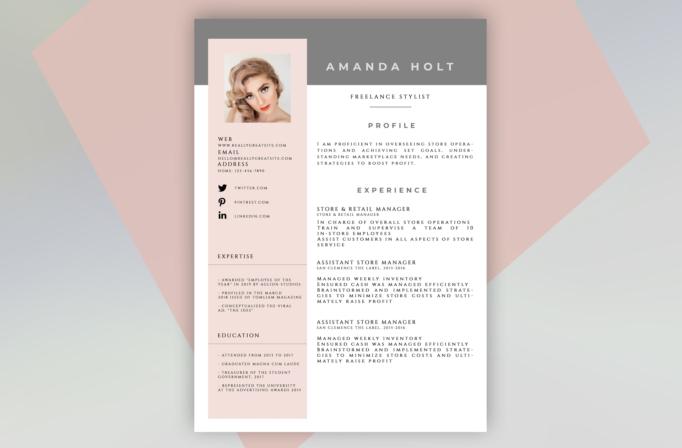
Free Photoshop Resume Template 36 presents professional history in a soft fashion-editorial style. Its blush sidebar, warm gray masthead, serif typography, and carefully spaced uppercase headings suit a freelance stylist, beauty professional, fashion coordinator, or luxury retail manager. The page feels graceful and curated, with enough structure for detailed experience while maintaining a boutique visual identity.
Design details
- A full-width warm gray header carrying the candidate’s name in widely tracked white capitals
- A pale blush vertical sidebar with a square portrait, contact information, social links, expertise, and education
- A broad white main column dedicated to profile and experience, with centered section headings
- Elegant serif body type and pronounced letter spacing that create a magazine-inspired appearance
- Fine gray and blush divider lines that separate content without making the page feel boxed in
The square headshot sits inside a softly tinted frame and overlaps the darker header area, giving the top of the resume a layered look. The right column carries the longest material, including a profile statement and multiple positions, while the narrower left rail keeps supporting facts easy to scan. The muted gray, black, white, and powder-pink palette is sophisticated rather than playful.
How to use it
- Download the ZIP file and open the included PSD in Photoshop.
- Insert a polished square portrait with clean lighting and enough room around the face for cropping.
- Replace the sample name, title, contact details, social accounts, profile, experience, expertise, and education.
- Edit each experience entry into short, achievement-focused statements so the tracked typography remains readable.
- Retain the blush and gray palette for the original editorial mood, or recolor both blocks together to match your personal brand before exporting a PDF.
Download
Download free-photoshop-resume-template-46.zip“>Download resume36.zip
Related templates
Visit the resume hub for guidance on stronger content, and consult the branding guide before changing the fashion-forward colors or type pairing.
FAQ
Can I edit this resume in Photoshop?
Yes. The PSD lets you update the portrait, text, colored panels, dividers, and typographic styling.
What should I change first?
Begin with the portrait and name masthead, then rewrite the profile and experience column. Check every line after editing because the generous letter spacing uses more horizontal room than standard body copy.
Can I use it for job applications today?
Yes. It is a strong choice for emailed applications, client introductions, and creative-industry interviews. For automated portals, confirm that your exported PDF remains searchable and keep a plain-text backup ready.








