
What this template is for
Free Photoshop Resume Template 24 is a dramatic photography resume with a black-and-white foundation and bright cyan accents. It is designed most naturally for photographers, photo assistants, and studio creatives who want their professional identity to feel cinematic and technical. The same layout could also support a videographer or image retoucher with a focused set of tools, projects, and production experience.
Design details
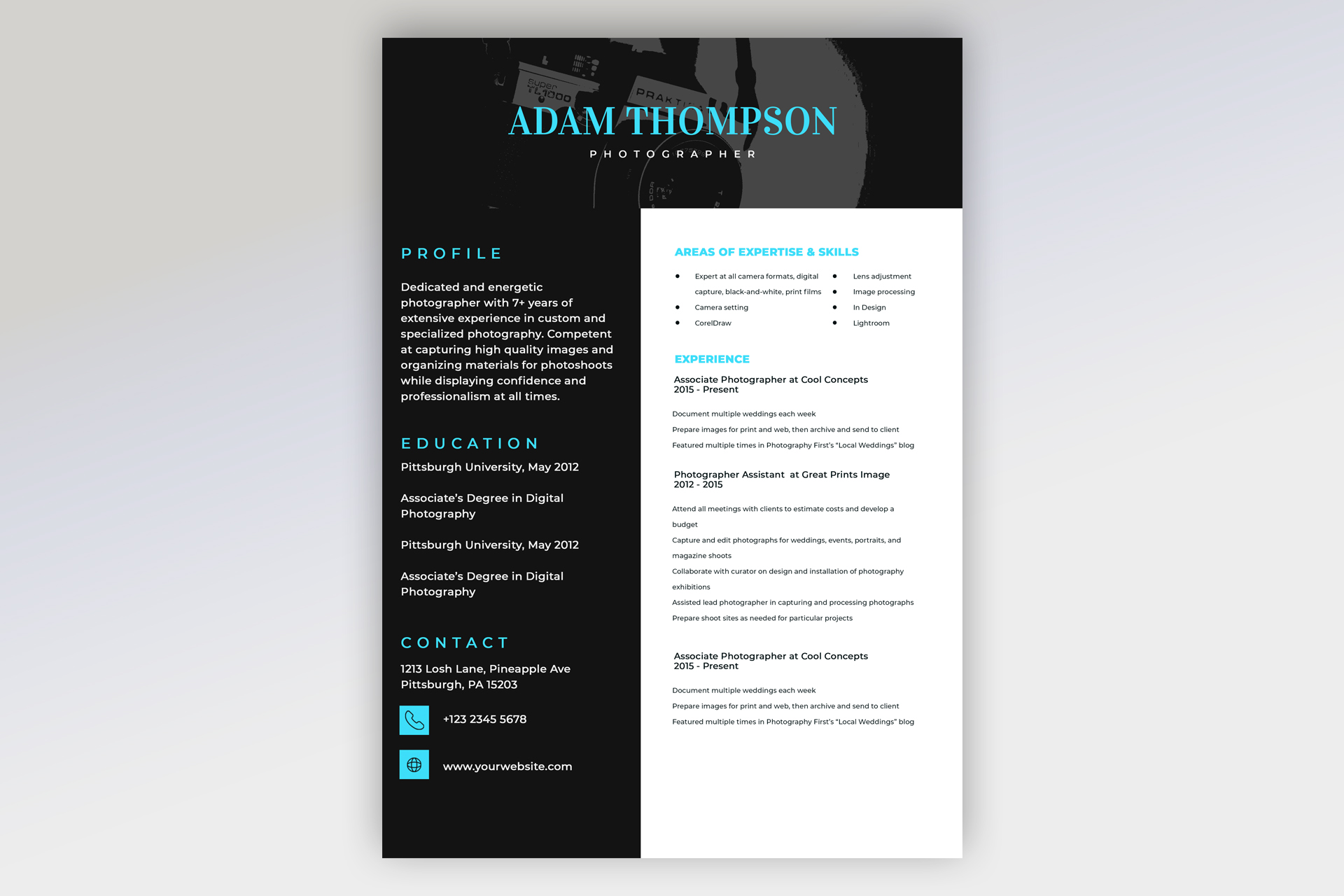
- A full-width black header featuring a low-contrast camera photograph, a large cyan serif name, and a widely spaced white profession label
- A black left column for profile, education, and contact information, contrasted with a white right column for expertise and experience
- Bright cyan uppercase headings with generous letter spacing, giving the page a crisp studio-brand feel
- A bold profile paragraph and education entries in white, plus cyan square contact icons for phone and website
- A two-part expertise list at the top of the white panel, covering camera, editing, layout, and image-processing skills
- Several experience entries with bold role and date lines followed by concise production responsibilities
The mood is confident, modern, and image-led without requiring a personal portrait. The camera banner immediately establishes the niche, while the asymmetrical columns separate personal background from professional evidence. The right side carries more information, so concise bullets and consistent spacing are important. Replacing the header photo with one of your own images can make the template feel like a genuine extension of your portfolio.
How to use it
- Download the ZIP file and open the PSD source in Photoshop.
- Replace the camera banner if desired, preserving enough dark space for the cyan name and white role to remain readable.
- Update the profile, education, contact details, expertise, software, roles, dates, and project responsibilities.
- Prioritize measurable photography work, such as shoot volume, publication credits, turnaround time, or exhibition support.
- Check contrast and text size, then export a PDF for applications and a JPG for portfolio or email previews.
Download
Download free-photoshop-resume-template-33.zip“>Download resume24.zip
Related templates
Use the resume hub to refine your experience bullets and the branding guide to coordinate the cyan accent with your photography site.
FAQ
Can I edit this resume in Photoshop?
Yes. The header image, colors, contact icons, typography, and all resume content can be customized in the PSD.
What should I change first?
Start with the name and header image, then rewrite the profile and expertise list so the page immediately communicates your photographic specialty.
Can I use it for job applications today?
Yes. It is well suited to studio and creative-industry submissions, especially when sent alongside a portfolio link.








