
What this template is for
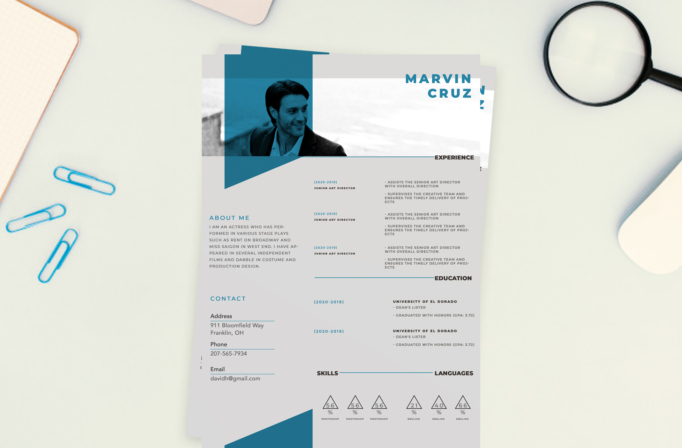
Free Photoshop Resume Template 16 is a contemporary resume with teal architectural shapes, a wide photographic header, and a highly structured information grid. Its angular overlays and blue-tinted portrait create a digital, forward-looking feel, while the body organizes the profile, contact details, experience, education, skills, and languages into clear zones. It is well suited to UI designers, digital marketers, multimedia specialists, and creative project leads.
Design details
- A panoramic header image crossed by transparent white and teal geometric panels
- A large two-line name in bright teal at the upper right, balanced against the portrait on the left
- A pale gray body with a narrow left column for profile and contact information, balanced by a wider right column for experience and education with fine teal rules and compact dates
- Triangle-based percentage graphics for software and languages, with repeated lines and angular shapes that give the page an energetic technical rhythm
How to use it
- Download the ZIP file and open the PSD source in Photoshop.
- Replace the panoramic photograph, then review its crop beneath the teal tint and translucent overlays.
- Update the name, about section, address, phone, and email in the left column.
- Add concise experience and education entries on the right. Preserve the aligned columns and thin divider rules. Rename the skill and language labels, update their percentages, and export the page as a PDF. Keep the systematic modern mood of the white, gray, black, and saturated blue-green palette, and favor an environmental portrait over a passport crop.
Download
Download free-photoshop-resume-template-24.zip“>Download resume16.zip
Related templates
Use the resume hub to strengthen your application content, and see the branding guide before changing the teal system to your own signature color.
FAQ
Can I edit this resume in Photoshop?
Yes. The PSD allows changes to the photograph, teal overlays, geometric decorations, percentages, typography, and all text.
What image works in the header?
Choose a wide photo with the subject toward the left and open background toward the right so the name stays clear.
Can I remove the language ratings?
Yes. That lower block can be renamed for tools, certifications, platforms, or any other three-part competency set.








