
What this template is for
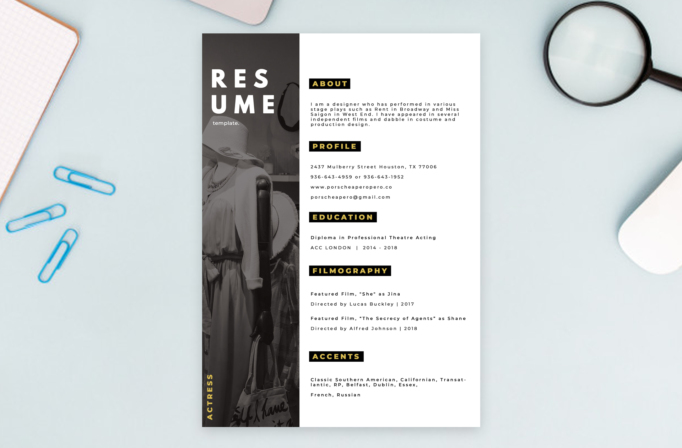
Free Photoshop Resume Template 2 is a highly visual one-page resume created for an actress or other creative professional. A narrow charcoal photo column occupies the left side, while a spacious white content area organizes the profile, education, credits, and specialist skills. The black, white, and golden-yellow palette feels theatrical and polished. This is a strong fit for an actor’s résumé, performer biography, fashion stylist profile, or creative portfolio introduction where personality and presentation matter as much as conventional work history.
Design details
- The left column combines a grayscale fashion portrait with a dark overlay, giving the page a cinematic visual anchor without competing with the written details.
- The word “Resume” is split across two large uppercase lines near the top, accompanied by a small lowercase label. A vertical “Actress” caption in yellow identifies the profession near the bottom.
- The wide white column uses generous margins and neatly separated sections for About, Profile, Education, Filmography, and Accents.
- Each section heading appears in tracked golden-yellow capitals inside a compact black rectangle, creating a repeatable hierarchy that is easy to scan.
- Body copy uses widely spaced characters and short lines, reinforcing the editorial mood. Contact information, training, screen credits, directors, dates, and performance accents each receive dedicated space.
How to use it
- Download the ZIP file and open the PSD source in Photoshop.
- Replace the left-side portrait with a high-resolution vertical image. A grayscale or muted photograph with a simple background will integrate most naturally.
- Update the profession label, biography, phone number, email, website, education, credits, dates, and specialist skills. Rename sections if your field uses different categories.
- Keep descriptions concise and check that the generous letter spacing does not force awkward line breaks. Remove any unused section instead of filling it with weak content.
- Export a sharp PDF for direct sharing and a high-quality JPG for portfolios or casting profiles. For automated hiring systems, also keep a separate plain-text resume.
Download
Download free-photoshop-resume-template-28.zip“>Download resume2.zip
Related templates
Visit the resume hub for application guidance and the branding guide for help shaping a consistent professional identity.
FAQ
Can I edit this resume in Photoshop?
Yes. You can update the portrait, headings, biography, contact details, credits, training, colors, and profession label in Photoshop.
What should I change first?
Begin with the portrait, profession label, biography, and contact information. Then replace the training, credits, dates, and specialist skills.
Can I use it for job applications today?
Yes, especially when a designed PDF is welcomed for acting or creative work. For automated portals, pair it with a plain-text resume because image-heavy layouts may not parse reliably.








