
What this template is for
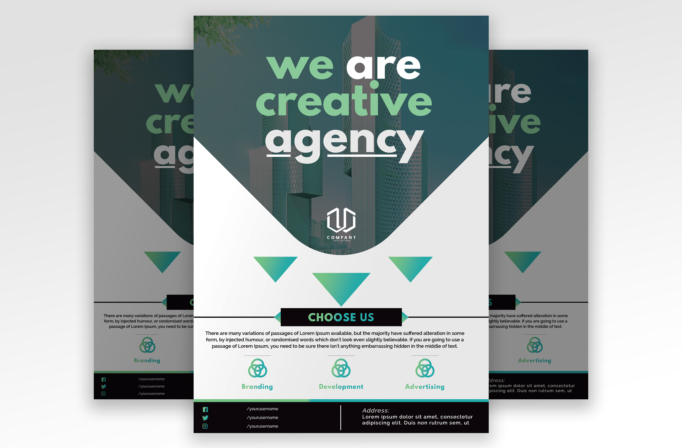
Free Brochure and Book Cover Photoshop Template 110 actually presents a one-page creative agency flyer. A teal-tinted architecture photograph supports the oversized “we are creative agency” statement, while a flowing white wave introduces three service highlights below. The clean corporate structure is enlivened by turquoise and green gradients, making the page suitable for a branding studio, digital agency, freelance collective, or marketing consultancy.
Design details
- The upper half uses a full-width city or architecture image with a deep teal overlay, creating a sophisticated backdrop for large white and mint typography.
- The headline is centered, stacked across three lines, and set in a heavy rounded sans serif. An underline emphasizes “agency” and reinforces the strong presentation style.
- A smooth white wave rises through the center, creating a distinctive transition from the photographic hero area to the informational lower half.
- Three downward triangles use a green-to-cyan gradient and visually guide attention toward the “Choose Us” banner and service row.
- Branding, Development, and Advertising appear as three evenly spaced services with matching outlined icons. A dark footer accommodates social handles and an address.
How to use it
- Download the ZIP and open the Photoshop source.
- Replace the hero photo with architecture, a workspace, or a team image that remains recognizable beneath a teal color treatment.
- Update the main statement, logo, service names, icons if needed, supporting paragraph, social handles, and contact address.
- Keep the three service labels similar in length so the lower grid remains visually balanced. Use the existing gradient as an accent or adapt it to your brand palette.
- Export a print-ready flyer for meetings and events, then produce a web version for outreach campaigns or a downloadable company overview.
Download
Download free-brochure-and-book-cover-photoshop-template-11.zip“>Download Flyer-Design-Template-110.zip
Related templates
Compare more promotional designs in the best flyer templates roundup and visit the business flyer hub for additional agency-friendly formats.
FAQ
Can I edit this flyer in Photoshop?
Yes. The hero image, text, colors, logo, icons, social links, and address can be adapted in Photoshop.
What should I change first?
Begin with the hero image and agency statement, then replace the logo, three service labels, supporting copy, social handles, and address.
Can I use it for print and social media?
Yes. A creative agency, branding studio, or marketing consultancy can use it for printed outreach and resize it for digital campaigns.







